


Who's this for?

Answer 3 quick questions to get matched with the best protection. Firstly, choose who or what you need to cover below.

What are you most concerned about?

We'll suggest the best coverage for your concerns. Select all that apply.

How many devices do you need to protect?

For the best protection, cover every device you use online.

Creating your recommendation

norton:productquiz:iconturninggears
Did you know?
Norton technology blocks millions of cyberthreats every day.
Trusted by millions of customers around the globe.
Norton™ Mobile Security
Standard
A$32.99
A$32.99first yr

Automatically renews at {ar}/year,
unless the renewal is cancelled.
Price is subject to change.
See subscription details below.*

  • Protection for 1 iPhone® or iPad®
  • Scam Protection
  • Wi-Fi Security
  • Internet Security
  • Device Security
Norton AntiVirus
Plus
A$75.99
A$75.99first yr

Savings compared to the renewal price of {ar}/year.
See subscription details below.*

  • 1 PC or Mac
  • Scam Protection
  • Antivirus, malware, ransomware, and hacking protection
  • 100% Virus Protection Promise2
  • 2 GB Cloud Backup‡‡,4
  • Password Manager
  • Deepfake Protection23,33
Norton 360
Standard
A$104.99
A$104.99first yr

Savings compared to the renewal price of {ar}/year.
Price is subject to change.
See subscription details below.*

  • 1 PC, Mac, tablet, or phone
  • Scam Protection
  • Antivirus, malware, ransomware, and hacking protection
  • 100% Virus Protection Promise2
  • 10 GB Cloud Backup‡‡,4
  • Password Manager
  • Deepfake Protection23,33
  • VPN private internet connection
Norton Identity Advisor
Plus
A$119.99
A$119.99/first yr

Payment method required.
If not cancelled: {sale}/first year.
Then {ar}/year.
See subscription details below.*

  • Identity Restoration Support
  • Financial Monitoring​
  • Social Media Monitoring17
  • Dark Web Monitoring​§
  • Stolen Wallet assist
  • Identity Theft Insurance
Norton 360
Deluxe
A$149.99
A$149.99first yr

Savings compared to the renewal price of {ar}/year.
Price is subject to change.
See subscription details below.*

  • 3 PCs, Macs, tablets, or phones
  • Scam Protection
  • Antivirus, malware, ransomware, and hacking protection
  • 100% Virus Protection Promise2
  • 50 GB Cloud Backup‡‡,4
  • Password Manager
  • Deepfake Protection23,33
  • VPN private internet connection
  • Dark Web Monitoring§
  • Parental Control
Norton VPN Standard
VPN
A$129.99
A$129.99first yr

Savings compared to the renewal price of {ar}/year.
See subscription details below.*

  • IP masking to hide your online activities
  • Access your favorite content across borders
  • Ad Blocker to browse without annoying ads14
  • No-log policy to ensure your privacy
  • Kill Switch to help prevent privacy exposure
  • IP Rotation and Double VPN for extra privacy
  • AI-powered protection against scams, phishing, and malware.
  • Monitoring for your info on the dark web§
  • Password Manager to use strong passwords
  • 10GB of Cloud Backup4 for valuable files
A$349.99
A$349.99first yr

Savings compared to the renewal price of {ar}/year.
See subscription details below.*

  • 10 PCs, Macs, tablets, or phones
  • Get always-on cyber protection for your business devices.
  • Get 24/7 business tech support and expert help with virusesΔ.
  • Work and bank safer online with our secure browser22.
  • Store your passwords and usernames in our encrypted vault.
  • Close security holes with our automatic Software Updater21.
  • Enjoy more reliable PCs with our cleaner and optimizer21.
  • Monitor employee identity leaks on the dark web (5 contacts)§
  • Backup up to 500GB of your data in our secure cloud21.
  • Connect to the web more safely on-the-go with our VPN.
  • Enjoy safer and more reliable PCs with Driver Updater21.
Norton 360
Premium
A$194.99
A$194.99first yr

Savings compared to the renewal price of {ar}/year.
Price is subject to change.
See subscription details below.*

  • 5 PCs, Macs, tablets, or phones
  • Scam Protection
  • Antivirus, malware, ransomware, and hacking protection
  • 100% Virus Protection Promise2
  • 100 GB Cloud Backup‡‡,4
  • Password Manager
  • Deepfake Protection23,33
  • VPN private internet connection
  • Dark Web Monitoring§
  • Parental Control
Norton
Small Business
A$249.99
A$249.99first yr

Savings compared to the renewal price of {ar}/year.
See subscription details below.*

  • Get always-on cyber protection for your business devices.
  • Get 24/7 business tech support and expert help with virusesΔ.
  • Work and bank safer online with our secure browser22.
  • Store your passwords and usernames in our encrypted vault.
  • Close security holes with our automatic Software Updater21.
  • Enjoy more reliable PCs with our cleaner and optimizer21.
  • Monitor employee identity leaks on the dark web (5 contacts)§
  • Backup up to 250GB of your data in our secure cloud21.
Norton
Small Business
A$99.99/year

Price shown is for first year.
Plus applicable sales tax.
See subscription details below.* 

  • 5 PCs, Macs, tablets, or phones
  • Get always-on cyber protection for your business devices.
  • Get 24/7 business tech support and expert help with virusesΔ.
  • Work and bank safer online with our secure browser22.
  • Store your passwords and usernames in our encrypted vault.
  • Close security holes with our automatic Software Updater21.
  • Enjoy more reliable PCs with our cleaner and optimizer21.
  • Monitor employee identity leaks on the dark web (5 contacts)§
  • Backup up to 250GB of your data in our secure cloud21.


Your personalized matches

norton:productquiz:iconshieldnumber60
60-day money-back guarantee
  • Best choice

  • Better choice

  • Good choice

*Important subscription, pricing, and offer details:

  • By subscribing, you are purchasing a recurring subscription which will automatically renew.
  • The price quoted today is valid for the offered introductory term. After that, your subscription will be billed at the applicable monthly or annual renewal price here. The price is subject to change, but we will always send you a notification email in advance.

2 Requires an automatically renewing subscription for a product containing antivirus features. For further terms and conditions, please see norton.com/virus-protection-promise.
4 Only available on Windows systems (but not in S mode or on ARM processors).
21 Utilities Ultimate, Driver Updater, Software Updater, and Cloud Backup features are only available on Windows (excluding Windows in S mode and Windows running on ARM processor).
22 Private Browser is only available on Windows (excluding Windows in S mode and Windows running on ARM processor) and Mac.
Monitoring available on Windows™ PC, iOS, and Android™ devices. Not all features available on all platforms.
§ Monitoring not available in all countries and varies based on region.

norton:productquiz:iconquestionmarkspeechbubble

norton:productquiz:iconquestionmarkspeechbubble

norton:productquiz:iconquestionmarkspeechbubble

Macro viruses

A macro virus is defined as “a computer virus written in the same macro language used for software applications, such as word processors.”


laptop-with-headphone
Contents

A macro virus is defined as “a computer virus written in the same macro language used for software applications, such as word processors.” Microsoft Word and Excel are two examples of applications that feature powerful macro languages, which are embedded in documents so they run automatically when the documents are open. A macro virus subsequently releases a “chain of events in conjunction with the application.”

Help protect your digital life on your devices.

Are you afraid of losing your personal information or all the precious things on your computer? Get comprehensive protection with Norton Security Deluxe across all your devices – up to 5 PCs, Macs, smartphones or tablets.

Create an account today and try it free for 30 days on up to 5 of your devices.

How They Spread

Macro viruses spread whenever a user opens or closes an infected document. The most common methods of spreading such viruses include:

As with many other forms of viruses and malware, macro viruses are difficult to detect.

What They Do

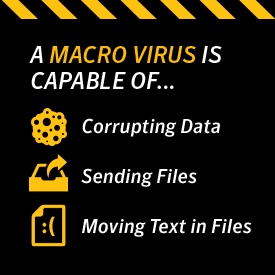
These viruses are programmed to do practically anything with a PC. This means a macro virus is capable of creating new files, corrupting data, moving text, sending files, formatting hard drives, and inserting pictures among other things. One of their more popular uses is as transportation for destructive viruses and malware.

A Classic Example

A now-classic example of a macro virus is the Melissa Virus from 1999. Opening an email containing a document infected with the virus would cause the email to send itself to the first 50 addresses in the user’s contact list. The virus subsequently replicated at an extraordinarily fast rate.

Application Rather Than Operating System

Because a macro virus centers on an application rather than an operating system, it has the ability to infect any operating system, including those on non-Windows computers.
macro viruses

Symptoms of a Macro Virus Infection

Symptoms of a macro virus infection include:

  • Your computer runs slower than normal.
  • Your computer asks you for a password on a file that normally doesn’t require one.
  • Your computer saves documents as “template” files.
  • Your computer features strange error messages.

How Do I Get Rid of a Macro Virus?

Getting rid of a macro virus requires taking it to a professional or checking manually for virus signs.

“To check for viruses manually, choose Tools | Macro | Macros and compare the resulting list of macros with the list you created earlier,” M. David Stone wrote for PC Mag in 2001. “Follow this procedure with the Macros in: box set for Normal.dot and for each file in your Startup folder.

“Pay particularly close attention to any macros named AutoExec, AutoOpen, AutoClose, FileExit, FileNew, FileOpen, FileSave, FileSaveAs, and ToolsMacro,” Stone added. “The first three names identify macros that run automatically. The rest replace built-in commands in Word and are common choices for viruses. If you have legitimate macros with these names, look at the contents of each with the aid of the Edit button. If none of your macros have been replaced or modified by a virus, you're almost certainly virus-free.

”How Do I Prevent Macro Viruses From Infecting My Computer?

As with all forms of cyber viruses and malware, prevention is best. Use the following tips to protect your computer:

  • Update your security system regularly to guard against new types of viruses.
  • Update your computer regularly to ensure optimal protection. For example, if you have Windows 8 and are being prompted to update to Windows 10, do it.
  • Use digital signatures. They identify download sources so you can be sure what you’re downloading and running isn’t a risk.
  • Download reputable antivirus software if you haven’t already.

Macro viruses are among the sneakier methods of infecting a computer. Stay aware of the latest information on these and all other cyber viruses, and give your computer a thorough scan if it hasn’t had one in awhile. And again, if you’ve been ignoring update notifications, now is the time to take action.

Norton logo
  • Norton
Norton empowers people and families around the world to feel safer in their digital lives

Editorial note: Our articles provide educational information for you. Our offerings may not cover or protect against every type of crime, fraud, or threat we write about. Our goal is to increase awareness about Cyber Safety. Please review complete Terms during enrollment or setup. Remember that no one can prevent all identity theft or cybercrime, and that LifeLock does not monitor all transactions at all businesses. The Norton and LifeLock brands are part of Gen Digital Inc. 


Want more?

Follow us for all the latest news, tips, and updates.