Who's this for?

Answer 3 quick questions to get matched with the best protection. Firstly, choose who or what you need to cover below.

What are you most concerned about?

We'll suggest the best coverage for your concerns. Select all that apply.

How many devices do you need to protect?

For the best protection, cover every device you use online.

Creating your recommendation

norton:productquiz:iconturninggears
Did you know?
Norton technology blocks millions of cyberthreats every day.
Trusted by millions of customers around the globe.
Norton™ Mobile Security
Standard
A$32.99
A$32.99first yr

Automatically renews at {ar}/year,
unless the renewal is cancelled.
Price is subject to change.
See subscription details below.*

  • Protection for 1 iPhone® or iPad®
  • Scam Protection
  • Wi-Fi Security
  • Internet Security
  • Device Security
Norton AntiVirus
Plus
A$75.99
A$75.99first yr

Savings compared to the renewal price of {ar}/year.
See subscription details below.*

  • 1 PC or Mac
  • Scam Protection
  • Antivirus, malware, ransomware, and hacking protection
  • 100% Virus Protection Promise2
  • 2 GB Cloud Backup‡‡,4
  • Password Manager
  • Deepfake Protection23,33
Norton 360
Standard
A$104.99
A$104.99first yr

Savings compared to the renewal price of {ar}/year.
Price is subject to change.
See subscription details below.*

  • 1 PC, Mac, tablet, or phone
  • Scam Protection
  • Antivirus, malware, ransomware, and hacking protection
  • 100% Virus Protection Promise2
  • 10 GB Cloud Backup‡‡,4
  • Password Manager
  • Deepfake Protection23,33
  • VPN private internet connection
Norton Identity Advisor
Plus
A$119.99
A$119.99/first yr

Payment method required.
If not cancelled: {sale}/first year.
Then {ar}/year.
See subscription details below.*

  • Identity Restoration Support
  • Financial Monitoring​
  • Social Media Monitoring17
  • Dark Web Monitoring​§
  • Stolen Wallet assist
  • Identity Theft Insurance
Norton 360
Deluxe
A$149.99
A$149.99first yr

Savings compared to the renewal price of {ar}/year.
Price is subject to change.
See subscription details below.*

  • 3 PCs, Macs, tablets, or phones
  • Scam Protection
  • Antivirus, malware, ransomware, and hacking protection
  • 100% Virus Protection Promise2
  • 50 GB Cloud Backup‡‡,4
  • Password Manager
  • Deepfake Protection23,33
  • VPN private internet connection
  • Dark Web Monitoring§
  • Parental Control
Norton VPN Standard
VPN
A$129.99
A$129.99first yr

Savings compared to the renewal price of {ar}/year.
See subscription details below.*

  • IP masking to hide your online activities
  • Access your favorite content across borders
  • Ad Blocker to browse without annoying ads14
  • No-log policy to ensure your privacy
  • Kill Switch to help prevent privacy exposure
  • IP Rotation and Double VPN for extra privacy
  • AI-powered protection against scams, phishing, and malware.
  • Monitoring for your info on the dark web§
  • Password Manager to use strong passwords
  • 10GB of Cloud Backup4 for valuable files
A$349.99
A$349.99first yr

Savings compared to the renewal price of {ar}/year.
See subscription details below.*

  • 10 PCs, Macs, tablets, or phones
  • Get always-on cyber protection for your business devices.
  • Get 24/7 business tech support and expert help with virusesΔ.
  • Work and bank safer online with our secure browser22.
  • Store your passwords and usernames in our encrypted vault.
  • Close security holes with our automatic Software Updater21.
  • Enjoy more reliable PCs with our cleaner and optimizer21.
  • Monitor employee identity leaks on the dark web (5 contacts)§
  • Backup up to 500GB of your data in our secure cloud21.
  • Connect to the web more safely on-the-go with our VPN.
  • Enjoy safer and more reliable PCs with Driver Updater21.
Norton 360
Premium
A$194.99
A$194.99first yr

Savings compared to the renewal price of {ar}/year.
Price is subject to change.
See subscription details below.*

  • 5 PCs, Macs, tablets, or phones
  • Scam Protection
  • Antivirus, malware, ransomware, and hacking protection
  • 100% Virus Protection Promise2
  • 100 GB Cloud Backup‡‡,4
  • Password Manager
  • Deepfake Protection23,33
  • VPN private internet connection
  • Dark Web Monitoring§
  • Parental Control
Norton
Small Business
A$249.99
A$249.99first yr

Savings compared to the renewal price of {ar}/year.
See subscription details below.*

  • Get always-on cyber protection for your business devices.
  • Get 24/7 business tech support and expert help with virusesΔ.
  • Work and bank safer online with our secure browser22.
  • Store your passwords and usernames in our encrypted vault.
  • Close security holes with our automatic Software Updater21.
  • Enjoy more reliable PCs with our cleaner and optimizer21.
  • Monitor employee identity leaks on the dark web (5 contacts)§
  • Backup up to 250GB of your data in our secure cloud21.
Norton
Small Business
A$99.99/year

Price shown is for first year.
Plus applicable sales tax.
See subscription details below.* 

  • 5 PCs, Macs, tablets, or phones
  • Get always-on cyber protection for your business devices.
  • Get 24/7 business tech support and expert help with virusesΔ.
  • Work and bank safer online with our secure browser22.
  • Store your passwords and usernames in our encrypted vault.
  • Close security holes with our automatic Software Updater21.
  • Enjoy more reliable PCs with our cleaner and optimizer21.
  • Monitor employee identity leaks on the dark web (5 contacts)§
  • Backup up to 250GB of your data in our secure cloud21.


Your personalized matches

norton:productquiz:iconshieldnumber60
60-day money-back guarantee
  • Best choice

  • Better choice

  • Good choice

*Important subscription, pricing, and offer details:

  • By subscribing, you are purchasing a recurring subscription which will automatically renew.
  • The price quoted today is valid for the offered introductory term. After that, your subscription will be billed at the applicable monthly or annual renewal price here. The price is subject to change, but we will always send you a notification email in advance.

2 Requires an automatically renewing subscription for a product containing antivirus features. For further terms and conditions, please see norton.com/virus-protection-promise.
4 Only available on Windows systems (but not in S mode or on ARM processors).
21 Utilities Ultimate, Driver Updater, Software Updater, and Cloud Backup features are only available on Windows (excluding Windows in S mode and Windows running on ARM processor).
22 Private Browser is only available on Windows (excluding Windows in S mode and Windows running on ARM processor) and Mac.
Monitoring available on Windows™ PC, iOS, and Android™ devices. Not all features available on all platforms.
§ Monitoring not available in all countries and varies based on region.

norton:productquiz:iconquestionmarkspeechbubble

norton:productquiz:iconquestionmarkspeechbubble

norton:productquiz:iconquestionmarkspeechbubble

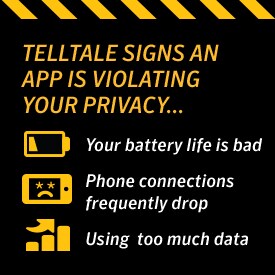
Telltale signs an app is violating your privacy

Malware isn’t just for laptops and desktops. In fact, it can be a lot easier for malware to end up on your mobile phone or tablet than your computer.


Image

Malware isn’t just for laptops and desktops. In fact, it can be a lot easier for malware to end up on your mobile phone or tablet than your computer. When it comes to mobile malware, a little bit of paranoia goes a long way. Malicious apps can steal your personal information, including sensitive financial information that can then be used to steal your identity. A lot of malware ends up on your phone due to malicious apps. So what are signs that you might already have a malicious app on your phone?

Slow Internet Connections

A slow Internet connection doesn’t always mean malware, but it is one of the few symptoms that even the most sophisticated malware can’t hide. Whether a malicious app is phoning home, communicating information about you or using your mobile device as part of a botnet scheme, it’s going to be using Internet bandwidth to do it. So if your connection speeds are all of a sudden crashing down to nothing, that can be a very clear sign that there’s something amiss with one of your apps.
signs app violating privacy

Large, Unexplained Charges

On the same token, one giveaway that you have a malicious app is that your phone bills are way bigger than what they ought to be. Massive phone bills can result from a malicious app that’s a data hog or a malicious app that’s sending lots of premium text messages, then sticking you with the bill. There are few surer signs that you’ve become a victim of a malicious app than by getting an astronomical phone bill with your name on it. If this happens, call up your phone company and start thinking seriously about which one of your apps is the culprit.

Using Too Much Data

Even if you don’t have huge charges, you want to keep an eye on your overall data usage. For example, you might have an unlimited data plan. In this case, a bill might not tell you much about what a malicious app is doing to your phone. You’d have to actually check the data usage to see if you had become a victim of a malicious app. Keep an eye on your data plan. Look for spikes in data usage. Again, this is one of the ways that even some of the most low-key malicious apps can give themselves away. There’s just no way to hide the use of data.

Your Battery Life Is Bad

Generally, you get a good idea of how much battery life to expect out of your phone. While it might vary by how vigorously the phone is being used, you’ll notice a decline in battery life if you’re the victim of a malicious app. Much like data usage, this is one area that even a sophisticated malicious app can’t conceal. The processes the malicious app is running require battery power and there’s no way around that. The battery life decline won’t be subtle or easy to ignore. One day, you’re getting by on a full charge all day, the next your phone’s battery is draining so quickly you have to charge it almost all day.

Phone Connections Frequently Drop

Dropped calls and other problems with your calling service can also be a sign that you have a malicious app. Much like with battery life, the key here is seeing differences. You might never get reception in one place, so if you continue to have dropped calls in areas with poor reception, that probably doesn’t mean anything. On the other hand, if you generally get crystal clear reception at home and then all of a sudden you’re not, a malicious app could be the culprit.

How to Stay Safe:

Malicious apps can be a real headache. Not only can they slow your phone’s performance, they can also lead to identity theft and financial troubles. Still, you can avoid getting them in the first place without much effort:

  • Install an Internet security suite on your phones and tablets such as Norton Security.
  • Don’t click links or download files from people you don’t know and never scan QR codes.
  • Always update your mobile apps and operating system as soon as possible. Lots of malicious apps are just ways of exploiting existing problems in your software. Updates patch these problems so that hackers have to find a new way in.
  • Only download apps from the official app store for your operating system. These apps tend t be heavily vetted, whereas apps being sold on third-party sites can be made by anyone.

Keeping your phone free of malicious apps isn’t that hard. It just requires a bit of due diligence and common sense on your part.
 

Norton logo
  • Norton
Norton empowers people and families around the world to feel safer in their digital lives

Editorial note: Our articles provide educational information for you. Our offerings may not cover or protect against every type of crime, fraud, or threat we write about. Our goal is to increase awareness about Cyber Safety. Please review complete Terms during enrollment or setup. Remember that no one can prevent all identity theft or cybercrime, and that LifeLock does not monitor all transactions at all businesses. The Norton and LifeLock brands are part of Gen Digital Inc. 


Want more?

Follow us for all the latest news, tips, and updates.