

Who's this for?

Answer 3 quick questions to get matched with the best protection. Firstly, choose who or what you need to cover below.

What are you most concerned about?

We'll suggest the best coverage for your concerns. Select all that apply.

How many devices do you need to protect?

For the best protection, cover every device you use online.

Creating your recommendation

norton:productquiz:iconturninggears
Did you know?
Norton technology blocks millions of cyberthreats every day.
Trusted by millions of customers around the globe.
Norton™ Mobile Security
Standard
A$32.99
A$32.99first yr

Automatically renews at {ar}/year,
unless the renewal is cancelled.
Price is subject to change.
See subscription details below.*

  • Protection for 1 iPhone® or iPad®
  • Scam Protection
  • Wi-Fi Security
  • Internet Security
  • Device Security
Norton AntiVirus
Plus
A$75.99
A$75.99first yr

Savings compared to the renewal price of {ar}/year.
See subscription details below.*

  • 1 PC or Mac
  • Scam Protection
  • Antivirus, malware, ransomware, and hacking protection
  • 100% Virus Protection Promise2
  • 2 GB Cloud Backup‡‡,4
  • Password Manager
  • Deepfake Protection23,33
Norton 360
Standard
A$104.99
A$104.99first yr

Savings compared to the renewal price of {ar}/year.
Price is subject to change.
See subscription details below.*

  • 1 PC, Mac, tablet, or phone
  • Scam Protection
  • Antivirus, malware, ransomware, and hacking protection
  • 100% Virus Protection Promise2
  • 10 GB Cloud Backup‡‡,4
  • Password Manager
  • Deepfake Protection23,33
  • VPN private internet connection
Norton Identity Advisor
Plus
A$119.99
A$119.99/first yr

Payment method required.
If not cancelled: {sale}/first year.
Then {ar}/year.
See subscription details below.*

  • Identity Restoration Support
  • Financial Monitoring​
  • Social Media Monitoring17
  • Dark Web Monitoring​§
  • Stolen Wallet assist
  • Identity Theft Insurance
Norton 360
Deluxe
A$149.99
A$149.99first yr

Savings compared to the renewal price of {ar}/year.
Price is subject to change.
See subscription details below.*

  • 3 PCs, Macs, tablets, or phones
  • Scam Protection
  • Antivirus, malware, ransomware, and hacking protection
  • 100% Virus Protection Promise2
  • 50 GB Cloud Backup‡‡,4
  • Password Manager
  • Deepfake Protection23,33
  • VPN private internet connection
  • Dark Web Monitoring§
  • Parental Control
Norton VPN Standard
VPN
A$129.99
A$129.99first yr

Savings compared to the renewal price of {ar}/year.
See subscription details below.*

  • IP masking to hide your online activities
  • Access your favorite content across borders
  • Ad Blocker to browse without annoying ads14
  • No-log policy to ensure your privacy
  • Kill Switch to help prevent privacy exposure
  • IP Rotation and Double VPN for extra privacy
  • AI-powered protection against scams, phishing, and malware.
  • Monitoring for your info on the dark web§
  • Password Manager to use strong passwords
  • 10GB of Cloud Backup4 for valuable files
A$349.99
A$349.99first yr

Savings compared to the renewal price of {ar}/year.
See subscription details below.*

  • 10 PCs, Macs, tablets, or phones
  • Get always-on cyber protection for your business devices.
  • Get 24/7 business tech support and expert help with virusesΔ.
  • Work and bank safer online with our secure browser22.
  • Store your passwords and usernames in our encrypted vault.
  • Close security holes with our automatic Software Updater21.
  • Enjoy more reliable PCs with our cleaner and optimizer21.
  • Monitor employee identity leaks on the dark web (5 contacts)§
  • Backup up to 500GB of your data in our secure cloud21.
  • Connect to the web more safely on-the-go with our VPN.
  • Enjoy safer and more reliable PCs with Driver Updater21.
Norton 360
Premium
A$194.99
A$194.99first yr

Savings compared to the renewal price of {ar}/year.
Price is subject to change.
See subscription details below.*

  • 5 PCs, Macs, tablets, or phones
  • Scam Protection
  • Antivirus, malware, ransomware, and hacking protection
  • 100% Virus Protection Promise2
  • 100 GB Cloud Backup‡‡,4
  • Password Manager
  • Deepfake Protection23,33
  • VPN private internet connection
  • Dark Web Monitoring§
  • Parental Control
Norton
Small Business
A$249.99
A$249.99first yr

Savings compared to the renewal price of {ar}/year.
See subscription details below.*

  • Get always-on cyber protection for your business devices.
  • Get 24/7 business tech support and expert help with virusesΔ.
  • Work and bank safer online with our secure browser22.
  • Store your passwords and usernames in our encrypted vault.
  • Close security holes with our automatic Software Updater21.
  • Enjoy more reliable PCs with our cleaner and optimizer21.
  • Monitor employee identity leaks on the dark web (5 contacts)§
  • Backup up to 250GB of your data in our secure cloud21.
Norton
Small Business
A$99.99/year

Price shown is for first year.
Plus applicable sales tax.
See subscription details below.* 

  • 5 PCs, Macs, tablets, or phones
  • Get always-on cyber protection for your business devices.
  • Get 24/7 business tech support and expert help with virusesΔ.
  • Work and bank safer online with our secure browser22.
  • Store your passwords and usernames in our encrypted vault.
  • Close security holes with our automatic Software Updater21.
  • Enjoy more reliable PCs with our cleaner and optimizer21.
  • Monitor employee identity leaks on the dark web (5 contacts)§
  • Backup up to 250GB of your data in our secure cloud21.


Your personalized matches

norton:productquiz:iconshieldnumber60
60-day money-back guarantee
  • Best choice

  • Better choice

  • Good choice

*Important subscription, pricing, and offer details:

  • By subscribing, you are purchasing a recurring subscription which will automatically renew.
  • The price quoted today is valid for the offered introductory term. After that, your subscription will be billed at the applicable monthly or annual renewal price here. The price is subject to change, but we will always send you a notification email in advance.

2 Requires an automatically renewing subscription for a product containing antivirus features. For further terms and conditions, please see norton.com/virus-protection-promise.
4 Only available on Windows systems (but not in S mode or on ARM processors).
21 Utilities Ultimate, Driver Updater, Software Updater, and Cloud Backup features are only available on Windows (excluding Windows in S mode and Windows running on ARM processor).
22 Private Browser is only available on Windows (excluding Windows in S mode and Windows running on ARM processor) and Mac.
Monitoring available on Windows™ PC, iOS, and Android™ devices. Not all features available on all platforms.
§ Monitoring not available in all countries and varies based on region.

norton:productquiz:iconquestionmarkspeechbubble

norton:productquiz:iconquestionmarkspeechbubble

norton:productquiz:iconquestionmarkspeechbubble

How to secure your passwords

Let’s face facts: it's easy to forget passwords. People often use simple words, such as a pet's name, or easy-to-remember dates such as a wedding anniversary. A hacker could try your name, children's names, birthdates and pets' names as passwords to get access to your computer.


Image

Let’s face facts: it's easy to forget passwords. People often use simple words, such as a pet's name, or easy-to-remember dates such as a wedding anniversary. A hacker could try your name, children's names, birthdates and pets' names as passwords to get access to your computer. When they get lucky, your ID, privacy and financial security are all up for grabs.

The significance of employing secure passwords is subsequently more important than ever. Hackers are hungry for passwords, as they have substantial monetary value. Data breaches and password leaks easily leave thousands of accounts vulnerable to being accessed by cybercriminals. With two-factor authentication (2FA), you get an extra layer of password protection that hackers can’t easily access, because the criminal needs more than just the username and password credentials. You’re actually using it already and you may not be aware of it. Your ATM card is a 2FA method via your physical card and your pin number.

Protect sensitive data by learning more about the 2FA method and employing a few key password tips.

The 2FA Method

2FA is a method of verifying your identity that adds a second factor of authentication in addition to your account password.

  • Something you know – a pin number, password or pattern.
  • Something you have – an ATM or credit card, mobile phone or security token such as a key fob or USB token.
  • Something you are – Biometric authentication such as a voiceprint or fingerprint.

How Hack-Proof Is It?

Nothing is 100% secure, and your account can still be vulnerable via hacking through password recovery options. Lost password recovery usually resets your password via email, and it can completely bypass 2FA. This can leave you vulnerable if the attacker has gained access to your email account associated with the account you use 2FA with. Be sure to monitor your email account for messages requesting password changes.

Password Security Measures You Need To Take

Use the following tips to create secure passwords:

Strong Password Creation

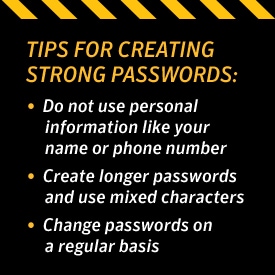
  • Do not use personal information. It's strongly recommended that you don't include any words related to your name or names of family members or pets in your passwords. Also, don't include easily recognizable numbers like your address, phone number or birthday. 
  • Do not use real words. Password cracking tools are very effective at helping attackers guess your password. These programs can process every word in the dictionary, plus letter and number combinations until a match is found. Steer clear of using "real" words from the dictionary or proper nouns or names. *Use mixed  characters. By combining uppercase letters with lowercase letters, numbers, and special characters such as "&" or "$" you increase the complexity of your password and decrease the chances of someone hacking into your system.   
img-how-to-secure-your-passwords


  • Create longer passwords for enhanced password protection. It is generally recommended that passwords be at least eight characters in length. Probability dictates that longer passwords are harder to crack.
  • Modify easy-to-remember phrases. One tip is to think up a pass-phrase, like a line from a song, and then use the first letter from each word, substituting numbers for some of the letters. For example: "100 Bottles of Beer on the Wall" could become "10oBb0tW".

Safe Password Storage

    • Don't write them down. Resist the temptation to hide passwords under your keyboard or post them on your monitor. Stories about hackers getting passwords by dumpster-diving and "shoulder-surfing" are absolutely real.
    • Use a password management tool. One way to store and ensure password security is to use a tool that stores your list of usernames and passwords in encrypted form. Some of these tools will even help by automatically filling in the information for you on certain web sites.

    Password Updates & Management

      • Change passwords on a regular basis. Online financial accounts should be changed every month or two, while you may choose to change your computer logon password every quarter.
      • Use different passwords on different accounts. Don't use the same password on more than one account. If a hacker discovers it, then all of the information protected by that password could also be compromised.
      • Do not type passwords on computers you do not control. When using your laptop in a Wi-Fi Hot Spot or a computer at an Internet café, you want to avoid any actions that require a username and password (such as online banking or shopping) because your data could be intercepted over the wireless network or with keystroke logging devices.

      Passwords are just one piece of the protection puzzle. To create a safer environment online, you will also want to use a firewall and other security products that help keep hackers out of your system and protect your identity online.

      Norton logo
      • Norton
      Norton empowers people and families around the world to feel safer in their digital lives

      Editorial note: Our articles provide educational information for you. Our offerings may not cover or protect against every type of crime, fraud, or threat we write about. Our goal is to increase awareness about Cyber Safety. Please review complete Terms during enrollment or setup. Remember that no one can prevent all identity theft or cybercrime, and that LifeLock does not monitor all transactions at all businesses. The Norton and LifeLock brands are part of Gen Digital Inc. 


      Want more?

      Follow us for all the latest news, tips, and updates.