







Instagram account hacked? Here’s how to recover it
Locked out of Instagram? Got a heads-up about strange messages coming from your profile? Somebody may have hacked your account, but all hope is not lost. Learn how to tell if your Instagram is hacked and how to get your account back. And get powerful online security with built-in scam protection to help thwart future attacks.




Instagram is one of the social media platforms most likely to be targeted by hackers. According to an Identity Theft Resource Center survey, 85% of social media account takeover victims had their Instagram accounts compromised.
If you’ve lost access to your account or noticed suspicious activity, acting fast is crucial. This guide will walk you through major signs that your Instagram has been hacked, steps you can take to get it back, and how to protect yourself from future social media threats.
Signs your Instagram is hacked
Suspicious activity, such as unauthorised changes to your profile or login details, can indicate that your account has been compromised. Here are a few key warning signs that someone has hacked your Instagram account or is actively trying to get access:
- Password reset emails: If Instagram sends you a password reset email you didn’t request, someone may be trying to access your account.
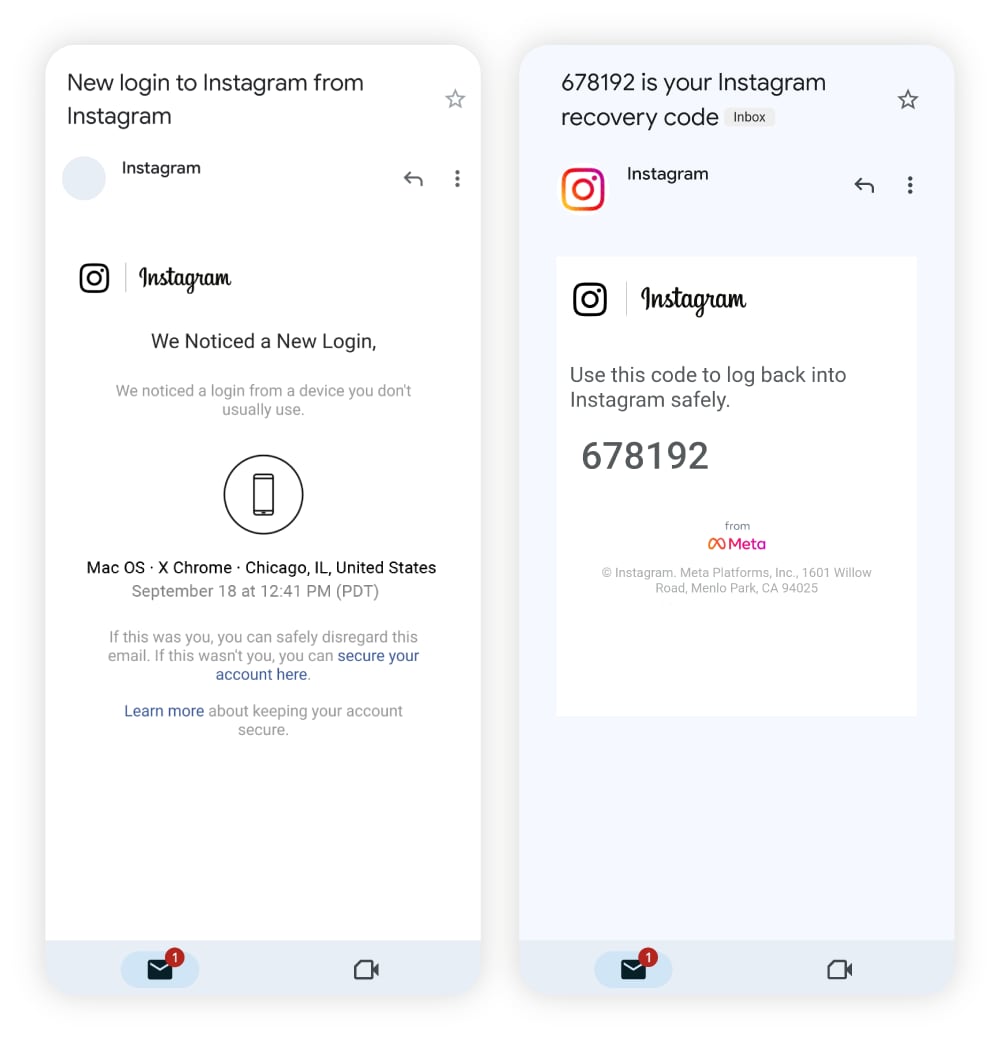
- Verification emails: When someone tries to log in from a new device or unusual location, Instagram will send a verification email to confirm the login. If this wasn’t you, consider it a red flag.
- Inability to log in: If you can’t sign in, someone may have hacked your Instagram and changed your password, logged you out, or changed the email address associated with your account.
- Changes to the linked email address: After gaining access to an account, hackers often change the associated email address to prevent you from using two-factor authentication (2FA) to regain control.
- Suspicious login alerts: If you get a notification asking if you recently logged in, but if it wasn’t you, it could mean someone is trying to hack your account.
- Strange posts on your profile: If photos, Stories, Reels, or Threads you didn’t post appear on your profile page, a hacker likely posted them.
- Messages you didn’t send: Scammers may pose as you and send messages from your account containing malicious links to your friends and family.
- Updated profile information: After cybercriminals get into your account, they may change your username, bio, and other identifying information.
What do I do if my Instagram has been hacked?
If you think your account may have been breached, acting fast after a hack can help re-secure your profile and personal data without having to go through the full account recovery process.
Here’s what to do if you think you’ve been hacked:
- Change your password immediately to a new, secure password if you still can. Use a password manager if you struggle to remember your login credentials.
- Log out on all other devices that may still be connected to your Instagram account.
- Turn on 2FA to make it harder for hackers to get back into your account. Go to Settings > Accounts Centre > Password and security > Two-factor authentication.
- Remove apps you didn’t install from your device. Suspicious apps may be malware in disguise that you downloaded unintentionally.
- Alert your followers and warn them not to open or click on any suspicious messages that appear to come from your account.
- Scan your device for malware using trusted antivirus software. This will help get rid of spyware like keyloggers, which may have covertly compromised your account.
- Report the issue to Instagram at https://www.instagram.com/hacked/.
How to recover your hacked Instagram account
If somebody hacked your Instagram and you can’t get back in to change your password, it’s still important to act fast to limit the impact of the hack and increase your chances of recovering the account.
Follow these steps to get your Instagram account back:
1. Check your email for a security message from Instagram
Instagram sends an email from security@mail.instagram.com to your primary email address whenever a new device attempts to sign in or someone tries to change your account’s email or password.
The email will ask if you made these changes and provide a link to accept or deny them. Denying reverses the change and helps secure your account. If you still have access, verify your email and recovery phone number, then change your password immediately.
2. Request a login link directly from Instagram
If you’re locked out of your account, Instagram can send you a login link to regain access. Follow these steps on desktop or mobile:
- Select Forgot password? on the login screen to start the recovery process.
- Enter your username, email address, or phone number, then tap Next or Send login link.
- Choose your email address or phone number to send the login link, then tap Next.
- Tap the login link in the email or text message you receive, and follow the prompts to complete the process.
3. Ask for a security code
A security code is similar to a login link, except it requires setting up 2FA on your account. If you’ve already enabled 2FA, you can choose Forgot password? on iOS devices or Get help logging in on Android devices, then request a new code.
Instagram then sends the code to your phone or your authenticator app, allowing you to log back in and secure your account.
4. Verify your identity
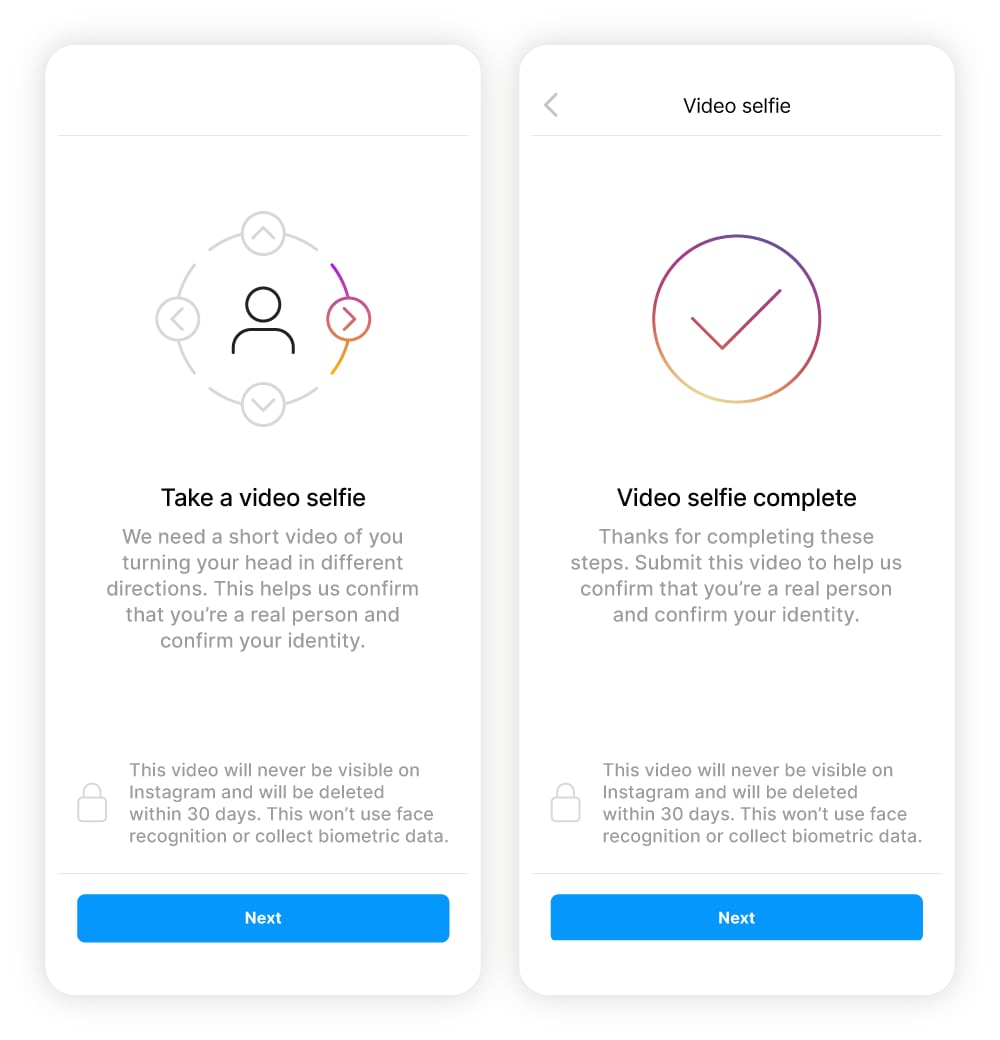
If other methods to secure your account fail, Instagram’s identity management process may require you to submit a selfie video from different angles for identity verification. If your account contains photos of you on your profile, they’ll compare them with the video and help you regain access to your account.
Instagram Support may also ask other questions about your account to prove you’re the rightful owner. You might have to send them your phone number, the email address you used to create the account, and details about the device that you used to sign up.
5. Contact Meta Support
If you have a Facebook Business account connected to your personal Facebook and Instagram accounts, try contacting Meta Support through that account. You may resolve the issue faster through your business account than through Instagram’s support channels.
You can also use Meta’s Account Centre to reset your password and secure your account. The Account Centre is a hub where connected Facebook and Instagram account settings are accessible in one place. You can also use the Account Centre to set up 2FA.
How do Instagram accounts get hacked?
Different types of hackers use various tactics to hijack social media accounts. Some of the most common methods include:
- Phishing: Scammers send fake emails or direct messages using phishing links that, when clicked on, install malware onto your device or prompt you to reveal your login details or other personal information.
- Smishing: This is a form of phishing where scammers send text messages (SMS) posing as Instagram. The term ‘smishing’ is a portmanteau of ‘SMS’ and ‘phishing’.
- Spyware: Malware like spyware or keyloggers can monitor your device activity and record what you type. Clicking unknown links or downloading unsafe apps may infect your device with such malware, giving hackers access to your Instagram account.
- Email hacks: A hacked email account can allow bad actors to change your Instagram login credentials, especially if you haven’t enabled 2FA.
- Third-party app vulnerabilities: Unsecured third-party apps can serve as backdoors for hackers, and malicious apps can steal login credentials.
- Weak passwords: Hackers exploit weak or reused passwords through brute force attacks, social engineering tactics, or by gathering clues via social media.
- Security breaches: Data breaches on other sites can expose your login credentials. If you reuse passwords, hackers could use leaked data to access accounts like your Instagram.
- Public Wi-Fi: Connecting to unsecured public Wi-Fi makes your device vulnerable to hackers looking to steal your login credentials — especially if you don’t use a VPN to encrypt your connection.
How can I protect my Instagram account from hackers?
Social media security doesn’t have to be a full-time job. Follow these best practices to stay safe online and keep hackers out.
- Install scam protection tools: Use advanced security software like Norton 360 Deluxe which offers AI-enabled anti-scam features to help keep you and your accounts secure.
- Limit third-party app usage: Only connect trusted apps to your Instagram and revoke access to those you no longer use to reduce security risks.
- Use autosave features: Instagram’s autosave feature saves a copy of your photos to your camera roll, ensuring you won’t lose them if somebody hacks your account.
- Be mindful of what you share: Safeguard your personal information, as hackers can use it to launch social engineering attacks, impersonate you, or guess weak passwords.
- Report suspicious activity: Immediately report any unusual account activity or suspicious profiles to Instagram.
- Enable 2FA: Two-factor authentication adds an extra layer of security to your account by requiring a second form of verification — like an SMS or email code — along with your password.
- Create unique passwords: Set secure passwords for all your accounts to make them harder to crack. A password manager can help you keep track of them.
- Monitor your login activity: Instagram tracks the devices you use to log into your profile, so review them regularly and remove any you don’t recognise.
- Don’t click suspicious links. Links in texts, emails, and direct messages from unknown sources can lead to malware and phishing attacks.
- Set login activity alerts: Get notified whenever your account is accessed from a new device to catch suspicious activity early on.
- Use dark web monitoring: Sign up for a Dark Web Monitoring service that patrols the dark net and warns you if it finds your personal information has been exposed.
Stay safe from Instagram hack attacks
Cybercriminals are constantly finding new ways to compromise accounts, so taking proactive steps to secure yours is essential. Norton 360 Deluxe includes a powerful arsenal of cybersecurity tools that can help keep your Instagram safer from hackers.
Help safeguard your entire digital life with powerful protection from malware that spies on your passwords, a built-in VPN to encrypt the data you send and receive, AI-powered scam detection, and dark web monitoring to help you identify account vulnerabilities.
FAQs
How do I secure a hacked Instagram account I can’t access?
In your Instagram app, look for the option to get help resetting your password and follow the instructions. You’ll receive an email from Instagram that you can use to sign back in. If that doesn’t work, request help from their support team.
Can an Instagram video call be hacked?
Hacking an Instagram video call is possible, but it’s difficult since Instagram uses end-to-end encryption which adds a solid layer of protection to video calls. However, if a hacker has access to your device, they may be able to monitor your activity or even hack your webcam.
Can I be hacked through Instagram DMs?
You can be hacked through Instagram DMs if you click a phishing link. To help protect yourself from social media threats, avoid clicking unfamiliar links.
Can I contact Instagram support about a hacked account?
Yes, if your account has been hacked, visit Instagram’s hacked account page to get more information about recovering your account, or request support.
How long does it take to get your hacked Instagram account back?
It depends — if the hacker accessed your account and didn’t change anything, you might be able to get back in immediately. However, if they update your password and recovery options, it can take Instagram support days or even weeks to verify your identity and restore access.
Why do people hack Instagram?
Hackers generally target Instagram accounts to steal personal information, harass other users, resell appealing Instagram handles, or run large-scale Instagram scams.
Why would someone impersonate me on Instagram, and what can I do?
An impersonator on Instagram could be a scammer trying to exploit your reputation, image, and followers. They may be trying to spread harmful links or simply trying to gain attention. Report fake accounts to Instagram, and consider updating your profile details, including your bio, to warn followers about copycat accounts.
Can I recover my Instagram account if it was deleted?
You might be able to restore your Instagram account if somebody deleted it, but it depends on whether the account was permanently deleted or just disabled. While a temporarily disabled account can be re-enabled at any time, a deleted account cannot be recovered after 30 days.
My Instagram account was hacked and my email and phone number were changed. Can I still recover my account?
If the hacker changed your account’s email and phone number, you can contact Instagram support and submit a video selfie to confirm your identity and recover your account.
Instagram is a trademark of Instagram LLC.
· on 2FA to make it harder for hackers to get back into your account. Go to Settings > Accounts Centre > Password and security > Two-factor authentication.
Editorial note: Our articles provide educational information for you. Our offerings may not cover or protect against every type of crime, fraud, or threat we write about. Our goal is to increase awareness about Cyber Safety. Please review complete Terms during enrollment or setup. Remember that no one can prevent all identity theft or cybercrime, and that LifeLock does not monitor all transactions at all businesses. The Norton and LifeLock brands are part of Gen Digital Inc.




Want more?
Follow us for all the latest news, tips, and updates.