






Phishing email examples and how to identify them
Phishing emails are designed to be convincing, but there are some obvious red flags to look out for. Learn how to spot a fake email in your inbox with these real-world phishing email examples. Then get Norton 360 Deluxe to help protect you from hard-to-detect online scams and threats.
2025
Approved
Anti-Phishing

2025
Top Rated Product



- 1. Social media phishing emails
- 2. PayPal phishing emails
- 3. Amazon phishing emails
- 4. Google Docs scams
- 5. Suspended account phishing emails
- 6. Unusual activity phishing attempts
- 7. CEO phishing emails
- 8. Fake job scams
- 9. Apple phishing attacks
- How to recognise a phishing email
- Get Norton to help protect against phishing and online threats
- FAQs about phishing emails
Phishing emails are fraudulent messages that use social engineering tactics to trick you into providing personal information, downloading infected attachments, or clicking malicious links. As cybersecurity technology improves, seemingly simple scam tactics like fake emails continue to be an effective way for scammers to prey on victims and infect devices.
We’ve rounded up some of the most common phishing email examples to help you spot scam emails before you fall for them.
1. Social media phishing emails
Social media phishing emails can be the launchpad for Facebook, LinkedIn, TikTok, X (formerly Twitter), and Instagram scams. They usually mimic the platforms’ branding and logo to trick you into clicking malicious links or divulging sensitive data.
Phishing attacks related to social media scams often:
- Urge you to take immediate action to prevent an account from being disabled or deleted.
- Ask you to reset a compromised password or confirm login credentials.
- Include an alert that someone reported you to the administrator.
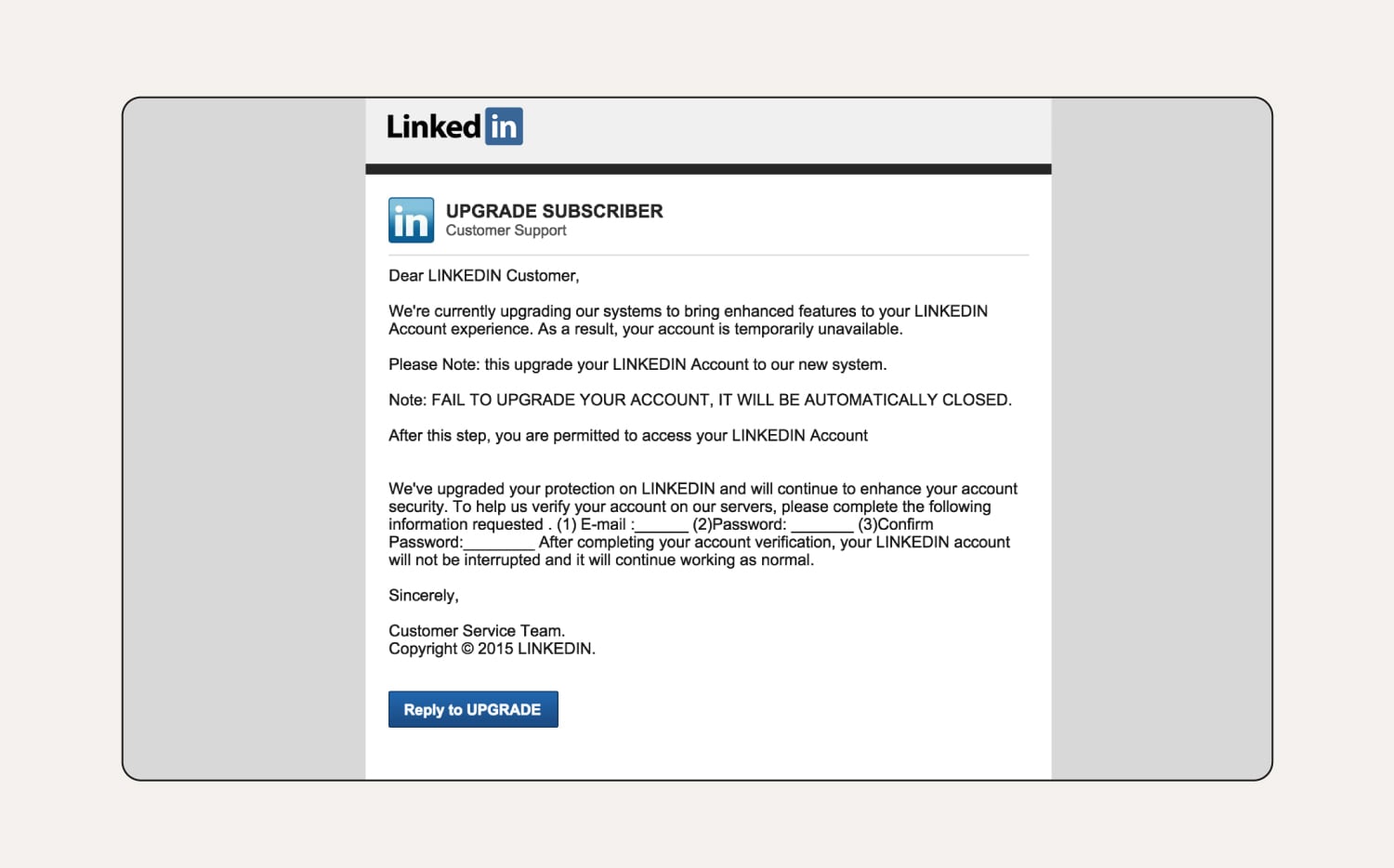
How to tell this is a phishing email:
In this LinkedIn scam, the user’s name isn’t specified in the greeting, which means it’s likely sent to multiple email addresses in bulk. The business name is in all capital letters throughout the email, which is not their trademark or branding. There are multiple grammar issues, which is uncommon for a reputable organisation. LinkedIn will also never ask you for your password via email.
2. PayPal phishing emails
Common PayPal scams include phishing emails that claim your account is about to be suspended or deleted, you've received a payment, or you’ve been paid too much. These emails often come with a link, prompting you to enter your password on a fake webpage.
Always log into PayPal directly to verify payments and notifications. Report suspicious emails to phishing@paypal.com and delete them from your inbox.
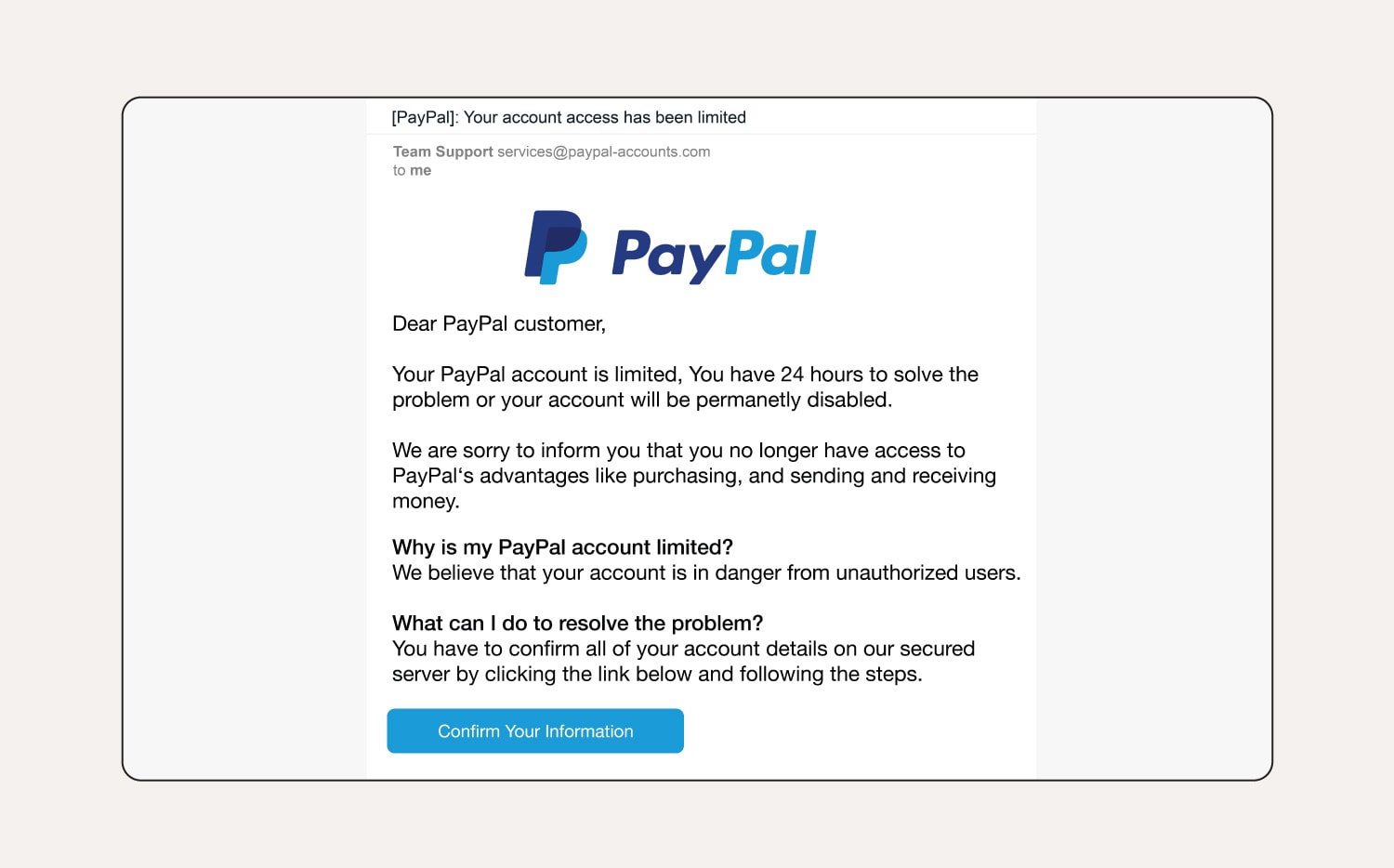
How to tell this is a phishing email:
The user’s name hasn’t been specified and it’s a generic greeting. The first sentence provokes a sense of urgency, hoping the user acts without thinking. There are also grammar and spelling errors in the email if you look closely.
3. Amazon phishing emails
These days many of us shop on Amazon regularly, with multiple orders out at the same time. Amazon scammers take advantage of this by sending emails that pressure recipients to act quickly and include links to fraudulent websites. Clicking these links can lead to a malware infection or information theft.
Examples of Amazon phishing emails include:
- Messages about locked or suspended accounts.
- Shipping emails for items that you didn’t order.
- Prompts to update payment info.
- Fake gift card surveys.
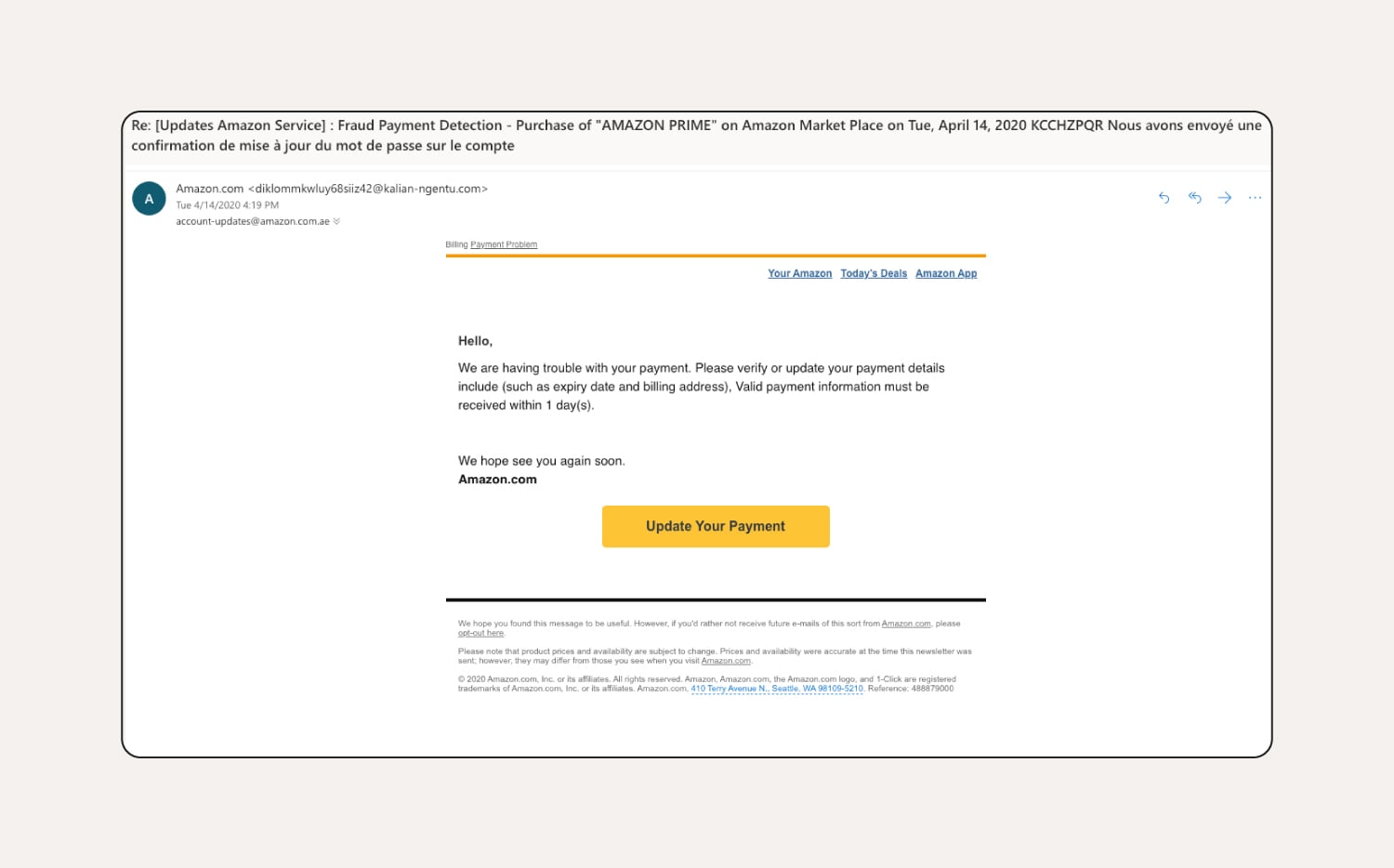
How to tell this is a phishing email:
This Amazon phishing email comes from a suspicious email address, doesn’t include the customer’s name, and pressures the customer to update their payment information quickly.
4. Google Docs scams
Users might receive deceptive Google Docs phishing emails that appear to be from friends, coworkers, or a business offering a great deal. The emails contain a malicious link to a supposed shared Google Doc. This link leads to a fake or unsafe website mimicking the Google sign-in page, where entering credentials grants scammers access to the user’s Google account.
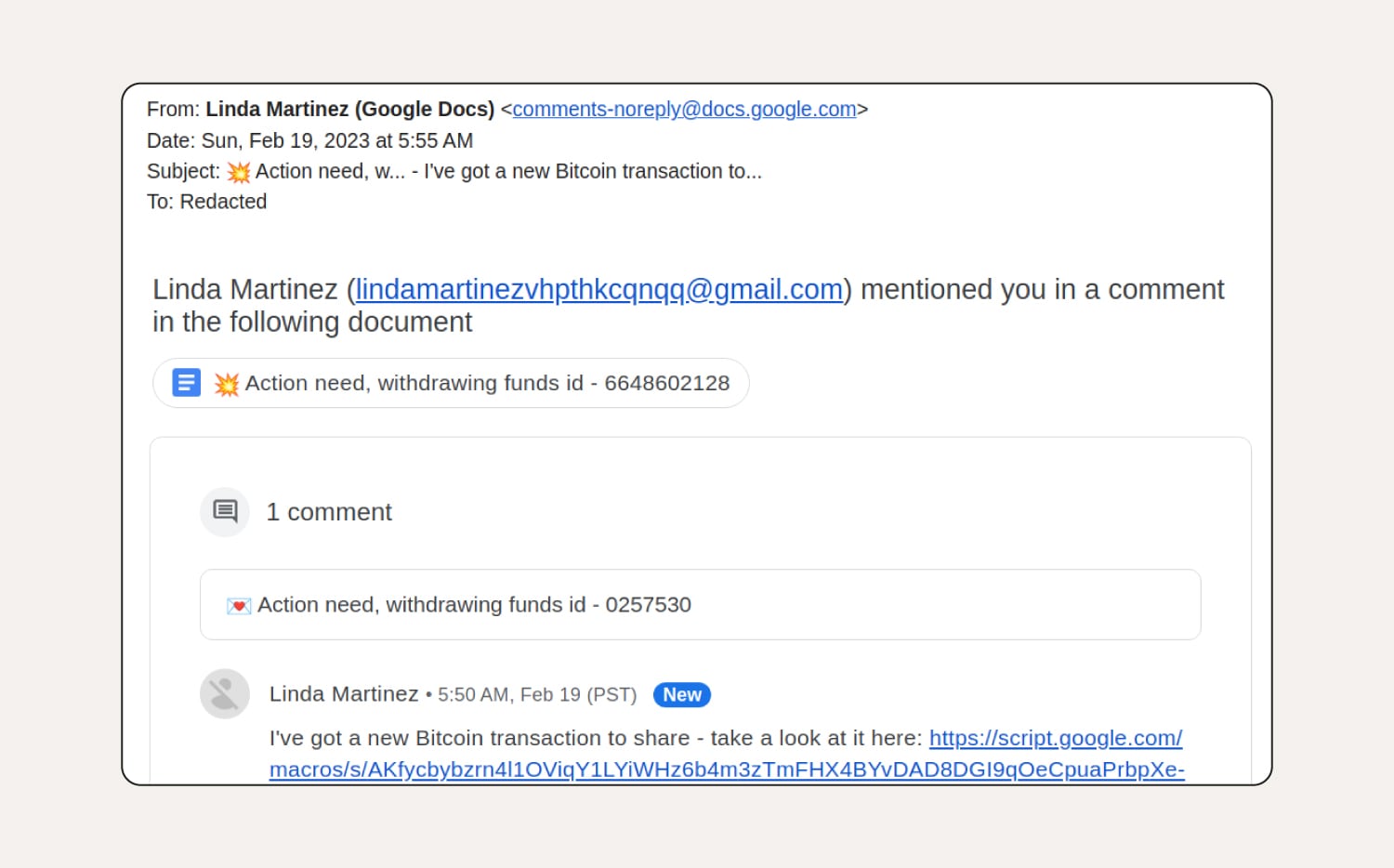
How to tell this is a phishing email:
This Google Docs phishing scam contains a link from an unknown contact, is addressed to 'Redacted', implies urgency, and the sender’s email address in the copy of the email looks suspicious.
5. Suspended account phishing emails
A suspended account phishing email scam is a cyberattack where scammers pose as legitimate companies claiming your account is suspended. They commonly cite reasons like suspicious activity, expired payment methods, or terms of service violations.
Once you click a link, you’ll be redirected to a fake website that looks like a legitimate login page, where scammers capture sensitive information.
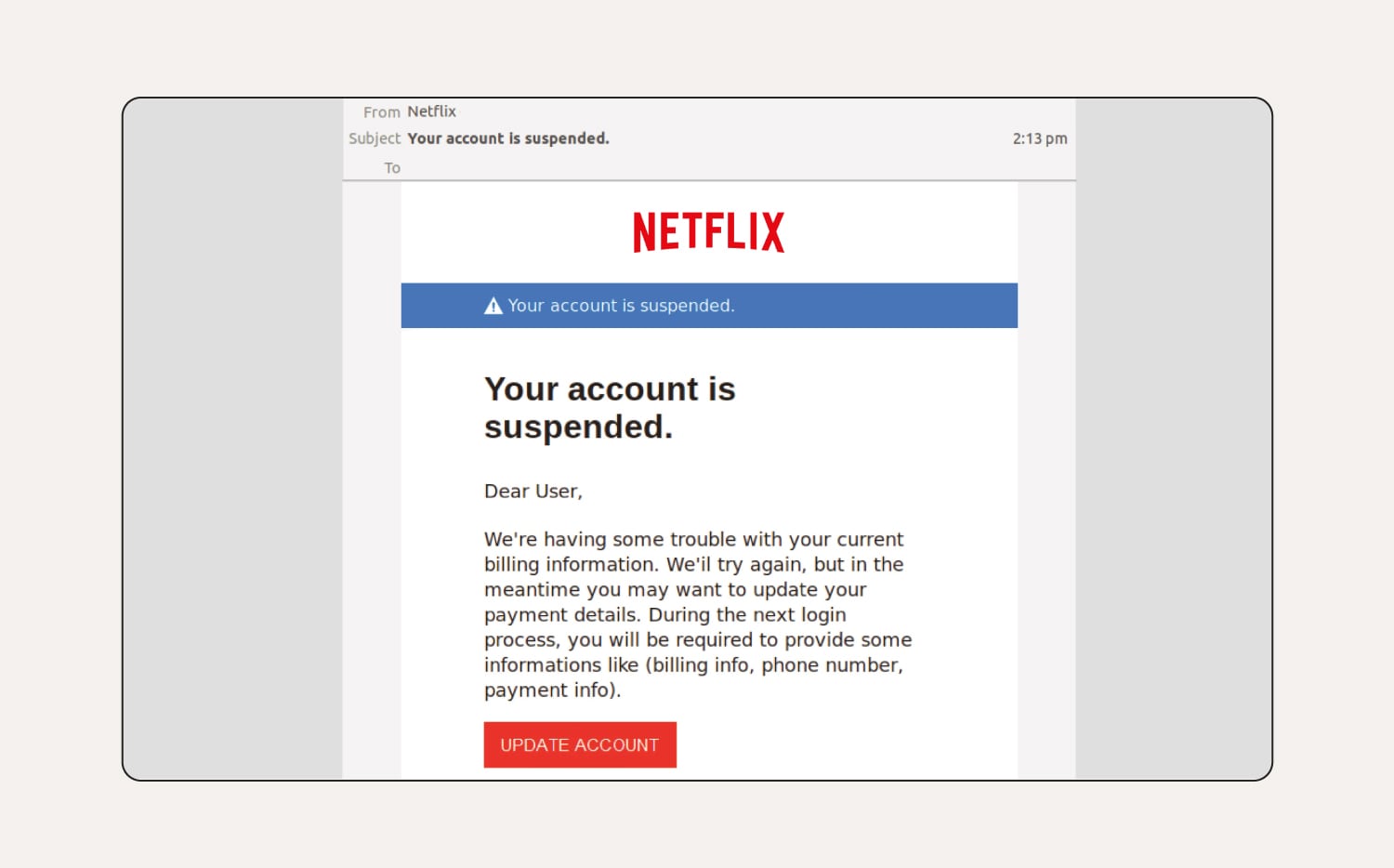
How to tell this is a phishing email:
There are spelling and grammar mistakes throughout the email. The customer's name is missing from the greeting and the 'To:' field is completely blank, meaning the email was likely part of a larger phishing campaign sent to multiple email addresses.
6. Unusual activity phishing attempts
Unusual activity phishing emails warn you about suspicious activity on your account and urge you to click a link to log in, change your password, or verify your account. Clicking the link sends you to a fake login page that looks like the business’s official page. Entering your details sends your information to a hacker, who can then access your account.
If you receive an email about usual activity, always independently navigate to the site or account via your web browser, without clicking any links in the email you received. If you’re concerned about unusual activity, you can change your password directly through the site or account affected.
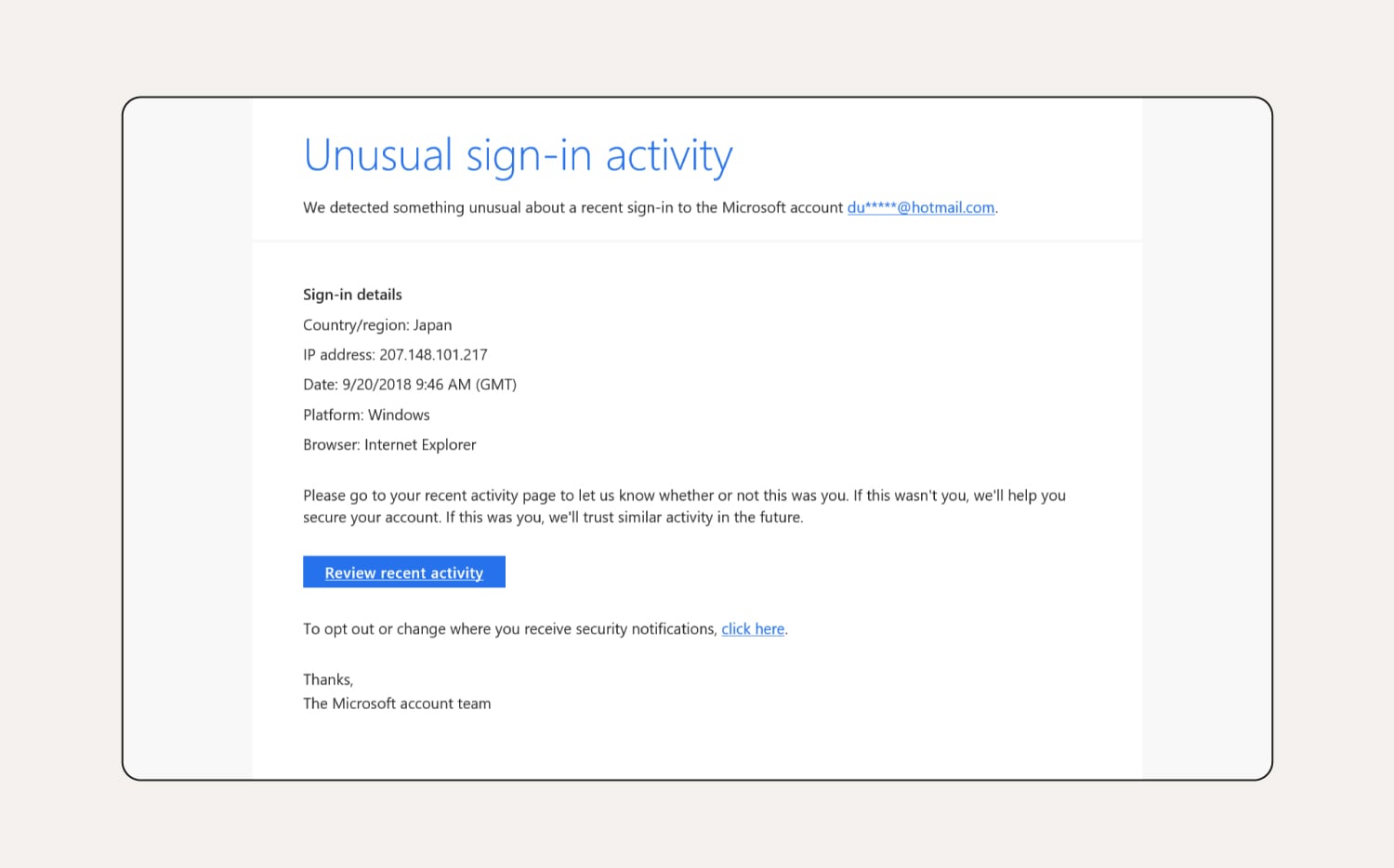
How to tell this is a phishing email:
It mentions Internet Explorer in the sign-in details, which is now a defunct web browser, and the login date listed is years ago. If you hovered over the links in the email, you’d probably notice the URLs aren’t what you expect either.
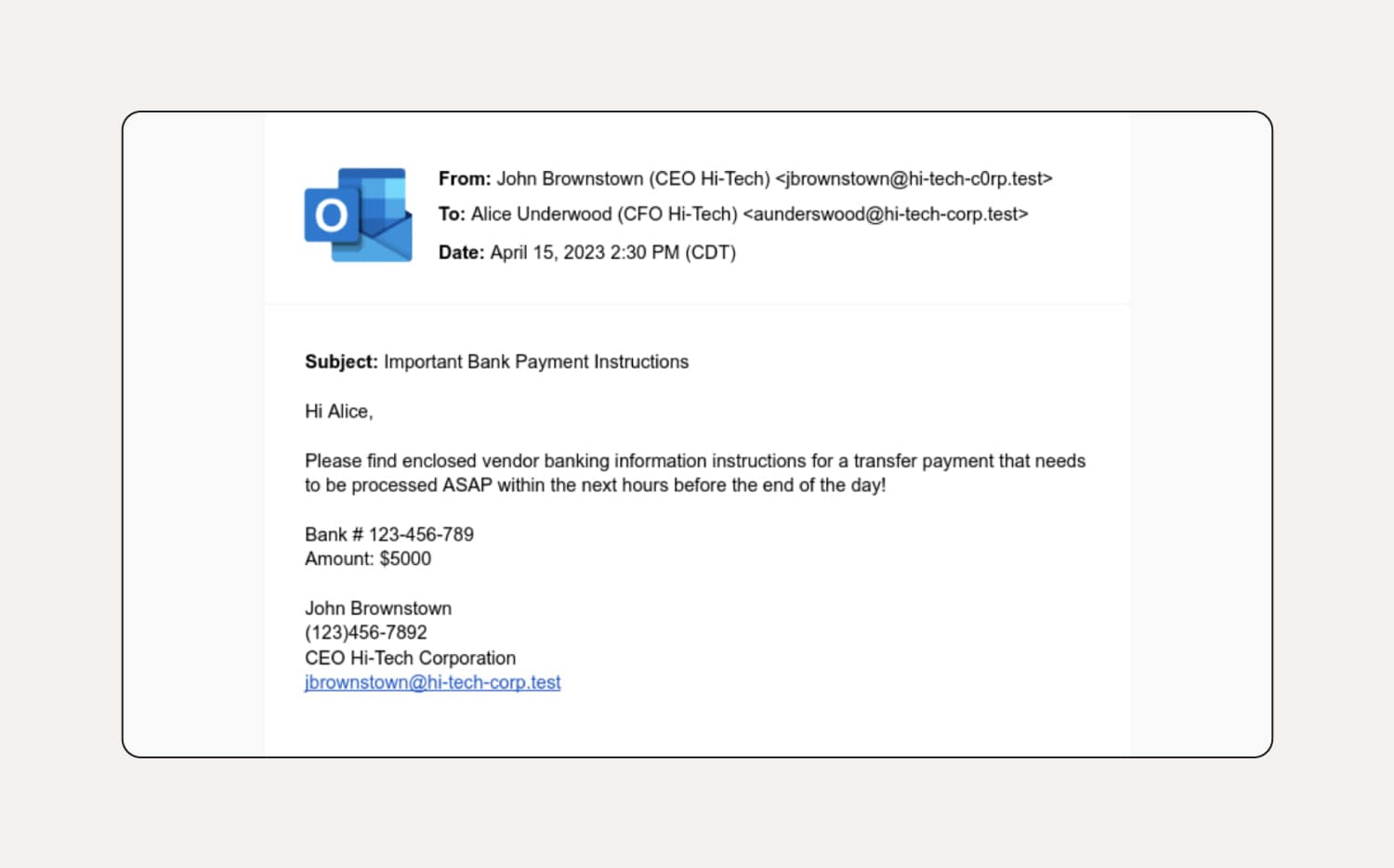
7. CEO phishing emails
CEO phishing emails come from scammers impersonating high-level executives like CEOs. This type of phishing — also known as executive phishing—targets employees, requesting personal information or imploring them to perform urgent tasks like completing wire transfers to vendors or clients. The result is the theft of funds or sensitive data.
How to tell this is a phishing email:
The first thing to notice in this CEO phishing email example is the sender’s email doesn’t match the email in their email signature. The classic tactic of urgency is employed, giving the recipient little time to consider the request. There are also grammatical errors and an unusual tone of voice — e.g., the CEO likely wouldn’t use formal language like ‘please find enclosed’ to a CFO with whom he works closely.
8. Fake job scams
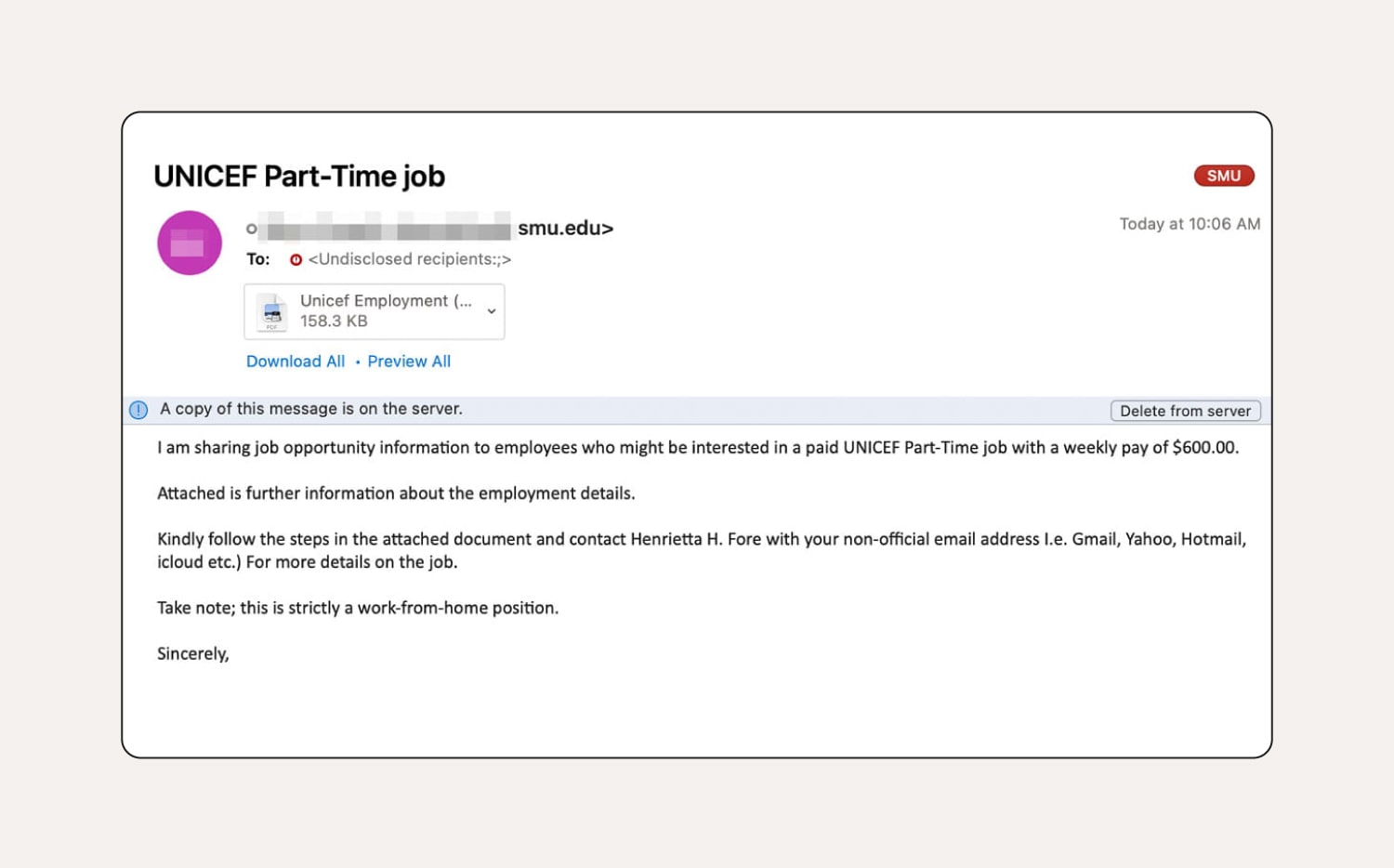
Fake job phishing emails, often promising high pay and no skills required, aim to lure people into work-from-home scams. These fraudulent job offers can involve upfront fees or ask for personal information such as tax file numbers and bank details to get started. They can also include attachments with malware.
How to tell this is a phishing email:
You can identify this fake job email because it’s sent from a suspicious email address — it should come from a .org instead of a .edu address. There are also some grammar issues, which you wouldn’t expect from UNICEF. The email has been sent to a work email (presumably to look like it’s from a headhunter), but they ask the recipient to provide their personal email. Finally, the attachment is titled ‘Unicef Employment’, which doesn’t match the organisation’s branding.
9. Apple phishing attacks
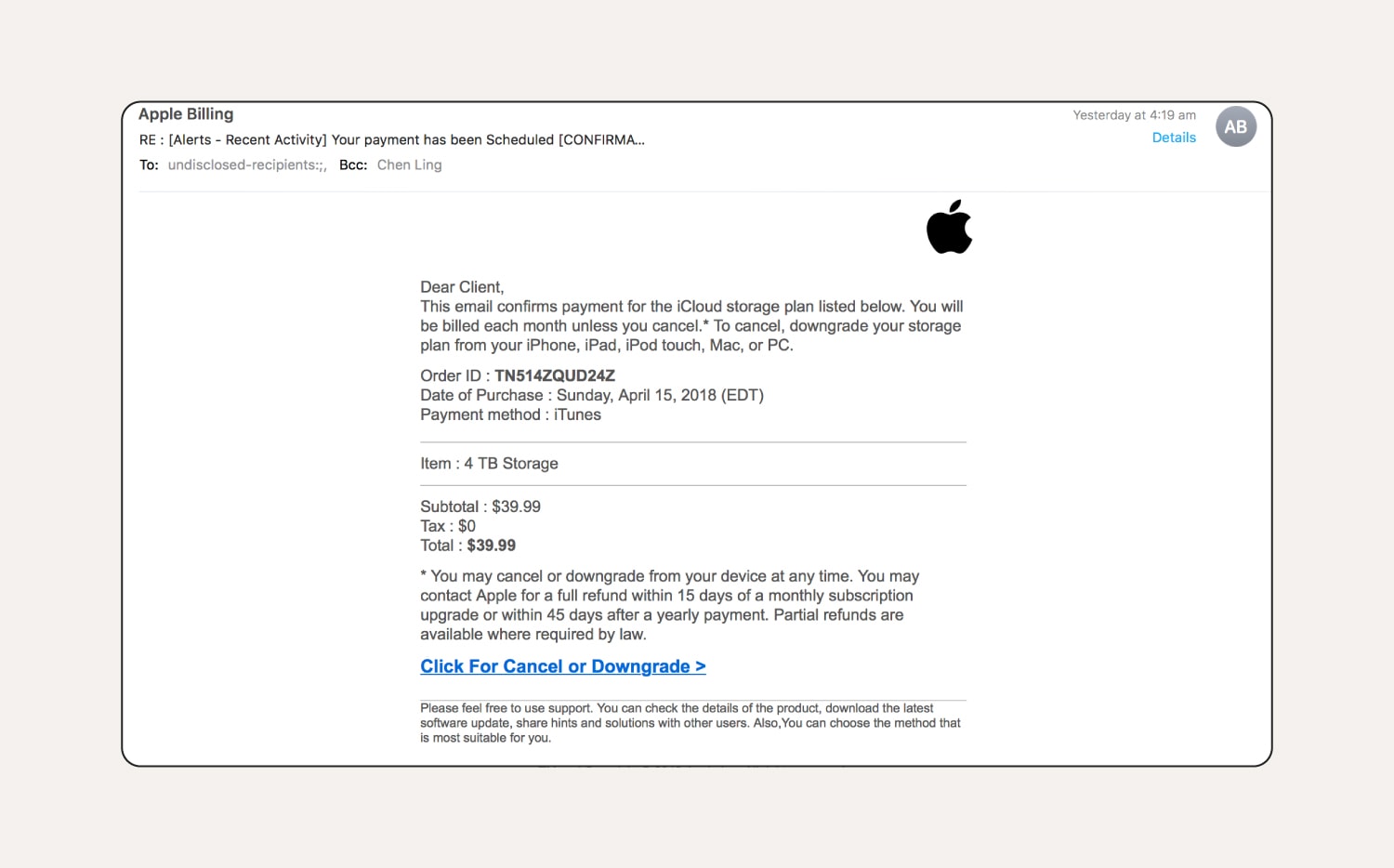
This type of phishing email targets users by impersonating Apple services like the App Store or iCloud, trying to trick them into revealing their Apple ID and password. Scammers might include messages warning about security issues, offering storage upgrades, sending fake purchase receipts, or claiming problems with Apple Pay.
These emails contain links to fake websites that mimic Apple's login page. With a user’s Apple ID and password, a scammer could access all the Apple services they use, leading to financial loss and identity theft.
How to tell this is a phishing email:
You can tell this Apple iCloud phishing email is fake because it starts with ‘Dear Client’ instead of using the user’s name, and it falsely claims that Apple offers a 4 TB iCloud storage plan. Plus, the email is sent to ‘undisclosed recipients’, has a name visible in the Bcc field, and uses poor grammar — more red flags.
How to recognise a phishing email
When confronted with a phishing email, there are some obvious red flags that can tip you off that it’s a scam. Here are common things you’ll find in phishing emails:
- Generic greetings: Because scammers often target a broad set of victims at one time, they often use generic greetings like ‘Dear customer’, or they may even skip the greeting altogether.
- Grammatical errors: Phishing emails often contain grammatical errors, misspellings, odd capitalisation, and unnatural phrasing. While typos happen, legitimate business emails shouldn’t have these mistakes.
- Low-resolution logos or images: Scammers often use copied logos to appear legitimate, but low-quality, blurry, or improperly sized logos are red flags. Be cautious if a logo looks fuzzy, pixelated, stretched, or requires close inspection to see it clearly.
- Suspicious sender email addresses: Look closely at the sender's email address. Phishers might create addresses that look similar to a real company, but with a minor typo or extra character. For example, ‘appel.com’ instead of ‘apple.com’.
- Strange URLs: Legitimate companies use clear URLs while phishing emails often link to suspicious ones. Hover your mouse over the link to see the URL before you click it.
- Requests for personal information: Legitimate companies won't ask for sensitive information like passwords or tax file numbers through email. If an email tells you to verify your account by clicking a link and entering your login details, it's likely a phishing attempt.
If you receive a suspicious email but aren’t sure if it’s legit or not, use a scam detection tool like Norton Genie. Take a screenshot of the suspicious email, then paste it into Norton Genie (being careful not to click any links in the email body!). Genie will then help you identify whether or not the email is a scam.
Looking out for the clues above will help you recognise potential phishing emails and avoid being scammed. But as you can see in some of the example emails, it’s not always easy to spot a fake email. That’s why you need strong antivirus software on all your devices. That way, if you ever do click a malicious link, your device will be equipped to help you detect and block the malware.
What do I do if I clicked a suspicious link in a phishing email?
If you fall for an email scam and click a suspicious link, act quickly. Here's what to do:
- Change your password: Create a secure password using a combination of numbers, letters, and symbols, and use unique passwords for every account to help prevent credential stuffing.
- Enable two-factor authentication (2FA): If you haven’t already, navigate to the account mentioned in the phishing email via your browser and activate 2FA (two-factor authentication). This will add an extra layer of protection against hackers trying to crack your account.
- Run antivirus software: A thorough scan will help detect different types of malware that may have infected your device.
- Report the phishing email: Report suspicious emails and scams to ScamWatch. You can also forward smishing attack texts to 0429 999 888.
- Alert financial organisations: If you've fallen victim to a phishing attack, alert your bank and credit card providers. You should also place a ban on your consumer credit report — request a ban with the three credit reporting bodies: Equifax, Experian, and Illion. The ban will help prevent them from being able to disclose your information as part of a credit check.
Get Norton to help protect against phishing and online threats
Scammers have evolved since the days of the Nigerian Prince scam — your security software should be able to keep up too. Advanced security software like Norton 360 Deluxe helps protect you from malicious threats hiding within phishing attack emails and other hard-to-detect online threats.
In fact, Norton blocked over 200 million phishing and scam threats in 2023 alone. Get Norton 360 Deluxe now to help protect against phishing attacks and stay safer online.
FAQs about phishing emails
You’ve seen some of the most common spam emails and phishing email examples, but do you still have questions? We have answers.
How do I protect myself from phishing attacks?
There are a few key things you can do to stay safer against phishing attempts:
- Don't click links or attachments in suspicious emails.
- Verify email addresses by looking for typos or suspicious domains (but still be careful as it could be a spoofed email).
- Beware of urgent language meant to pressure you into acting quickly.
- Never share personal information over email.
Can AI be used for phishing attacks?
Yes, scammers can use AI in phishing attacks. AI can personalise phishing emails, catch grammar and spelling errors, and generally make phishing attacks appear more convincing.
How can I report a phishing email?
Most email clients have a button or option to report phishing attempts. You can usually find this option by clicking the ‘menu' or 'options' feature in the email toolbar and selecting 'report’.
Editorial note: Our articles provide educational information for you. Our offerings may not cover or protect against every type of crime, fraud, or threat we write about. Our goal is to increase awareness about Cyber Safety. Please review complete Terms during enrollment or setup. Remember that no one can prevent all identity theft or cybercrime, and that LifeLock does not monitor all transactions at all businesses. The Norton and LifeLock brands are part of Gen Digital Inc.





Want more?
Follow us for all the latest news, tips, and updates.