



How to know if someone blocked your number
Not knowing if someone’s dodging your calls or if it’s just a tech glitch can be unsettling. Here’s how to know if someone blocked your number, so you can find out where you stand. And whether you’re blocked or not, strengthen your online privacy with a security app to help defend against online threats and protect your personal data.
2025
AAA award, 100%

2025
Top Rated Product




Not knowing if your texts and calls are going through can be frustrating, especially if you suspect you’ve been blocked. Whether you’re reaching out to a former employer or a friend who’s suddenly gone silent, not getting a response can leave you on edge.
In this guide, we’ll break down the key signs indicating that someone has blocked your number and tricks you can use to check if you’ve been blocked on both iPhone and Android devices.
Signs someone blocked your number
There are a range of signs that can clue you into whether someone may have blocked your number, including your calls going straight to voicemail and your texts not being delivered.
However, it’s important to rule out other potential causes before jumping to conclusions. Issues like phone hacking or phone account takeovers can also prevent you from connecting. And, if the person you’re trying to contact no longer has your number saved, their phone might be filtering your number as an unknown caller.
So, how do you know if someone blocked your number? If you've ruled those possibilities out and still suspect you've been blocked, here are the key signs to watch for.
1. Your calls go straight to voicemail
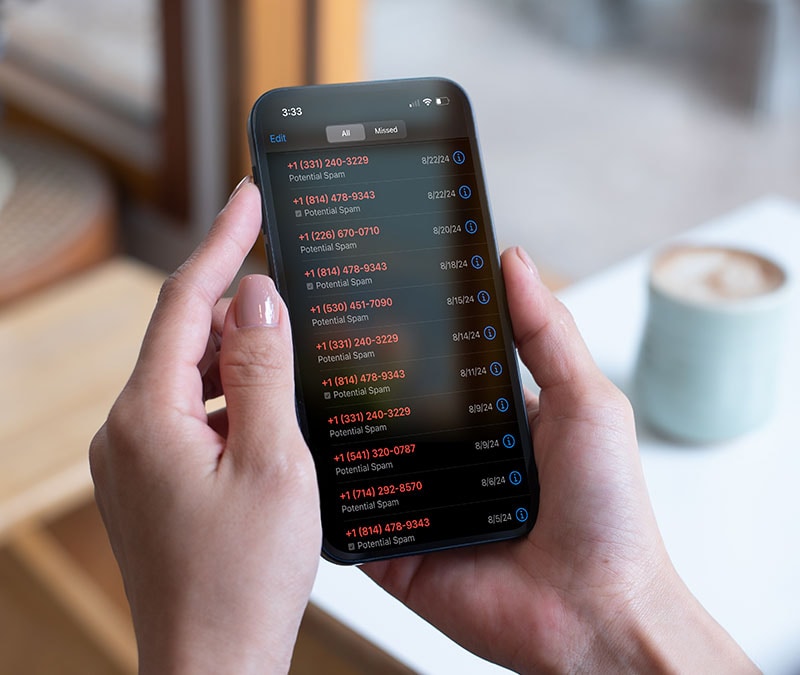
A call going directly to voicemail after just one ring can be a sign that the person you’re trying to get in touch with has blocked you. If you're not blocked, you’ll usually hear four to five rings before you’re redirected to voicemail, depending on the recipient’s device and settings.
If this happens once or twice, it may just be that the person you’re calling has enabled Airplane Mode or Do Not Disturb settings. However, if you've called multiple times over a longer time period and consistently get sent to voicemail without the phone ringing normally, it's a strong clue that you've been blocked.
2. Your text messages don’t deliver
If your text messages aren’t going through, it could mean the intended recipient has blocked your number. Most devices and messaging platforms indicate undelivered messages with a 'Not Delivered' status message or a symbol, like a red exclamation point.
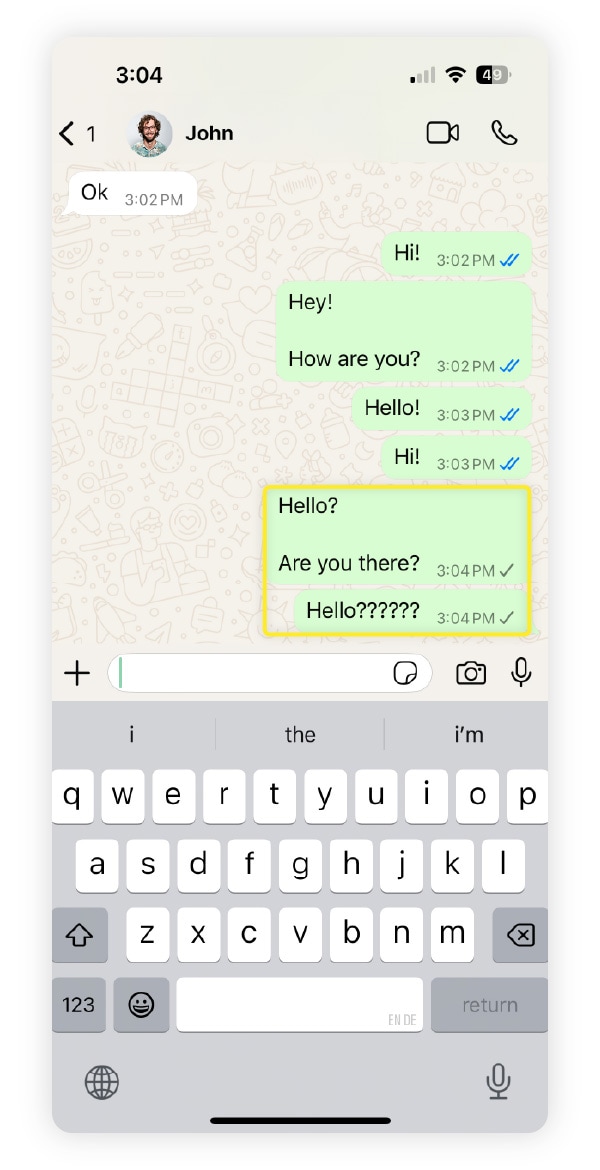
On secure messaging platforms like WhatsApp, for example, a message that’s successfully delivered will typically have two blue checkmarks next to it. However, you’ll only see one grey checkmark if your message can’t be delivered because the recipient has blocked you.
Just bear in mind that messages, particularly those sent via Wi-Fi or mobile data, can also fail to be delivered due to slow internet, network outages, or other technical issues.
3. Calls from another number go through
If you can make calls to the person you’re trying to reach from another phone number without issues, but still can’t get through using your own number, it’s a strong sign that you’ve been blocked.
If you don’t have access to another phone you can use to test this, you can try using a temporary phone number service or dial #31# before the number you’re calling to mask your caller ID.
However, remember that some people ignore anonymous calls, assuming they’re likely a scam.
4. You’re blocked on social media apps
Someone who’s blocked your phone number may also have blocked you on social media platforms. If they haven’t, you may be able to reach them there instead to troubleshoot why you can’t reach them via text or a phone call.
Here’s how to tell if somebody blocked you on popular social media platforms:
- Instagram: You search for their name but see no results, and tapping their username from existing comments or messages displays 'User not found'. Keep in mind that this could also mean they deleted their Instagram account.
- Facebook: Their name is missing from your friends list, and you can’t contact them on Messenger. Unless they deleted their Facebook account, these signs likely mean you’ve been blocked.
- Snapchat: You can’t find them in your friends list, and recent snaps or messages you’ve sent to them say 'Pending'.
- TikTok: Their account is missing from your following list, and you can’t view their TikToks or other content.
- X (formerly Twitter): You visit their profile and it shows '@username blocked you'.
- LinkedIn: Their profile disappears from your connections and search results, and you can no longer send them messages.
Remember that blocking isn’t always meant to be malicious. The person may just be protecting their social media privacy. It’s also important to reiterate that, on many platforms, it may look like you’ve been blocked if someone deletes their account.
How can you tell if someone blocked you?
While neither iPhone nor Android has a built-in feature to confirm if someone blocked you, certain tricks like checking for undelivered symbols on texts you’ve sent or checking whether a phone number is suggested as a contact can help you figure it out.
How to know if someone blocked your number on iPhone
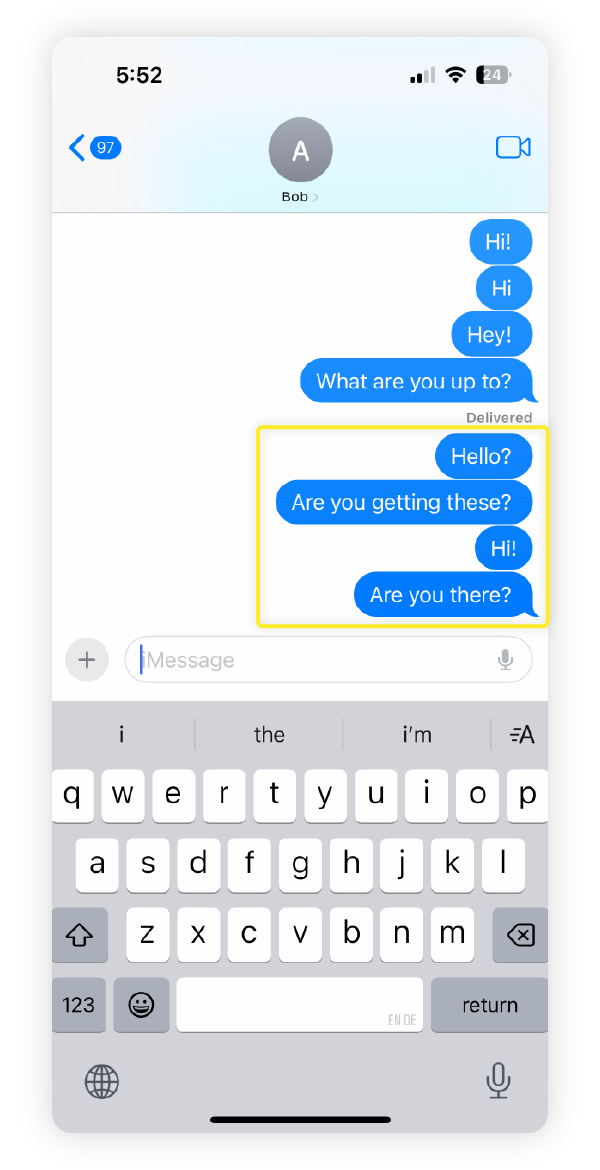
An iMessage that’s successfully delivered to a recipient will usually have a ‘Delivered’ status message beneath it. If the recipient has read receipts turned on, this may later change to ‘Read’ once they’ve viewed it. But if you’re blocked, your messages won’t show ‘Delivered’ at all.
How to know if someone blocked your number on Android
Android devices have a suggested contacts feature that can help you determine if you've been blocked. To do this, copy the phone number of the person you suspect has blocked you, then delete their contact details. Next, search for their number in the Contacts app. If their name doesn’t appear as a suggested contact, you might be blocked.
Someone blocked you — now what?
If you realise someone has blocked you and think it was intentional, it’s best to stop trying to make contact and avoid spamming them on other platforms. Repeated attempts to reach out could be seen as cyberstalking, which may have legal consequences like fines or even prison time in extreme cases.
Instead, practice good netiquette and respect their boundaries. If they want to reconnect, they can always unblock you in the future.
Blocked or not, your digital privacy matters
Everyone has the right to privacy online — whether you’re blocking someone or have been blocked yourself. While it can’t stop someone from blocking your number, get Norton 360 Standard to help protect your privacy and stay safer across the web. It can help you safeguard against online scams, malware, hackers, snoops, and more.
FAQs
Can you tell if someone blocked your number without texting or calling them?
No, it’s difficult to determine if someone has blocked your number without reaching out through a text message or call. While some third-party apps claim to detect if you’ve been blocked, there’s no official way to verify this. On Android, checking the suggested contacts feature might offer a hint, but it’s not a guarantee.
If someone has blocked me, will they still get my texts?
No, if someone has blocked you, they will not receive your texts.
Does 'Notifications Silenced' mean blocked?
No, seeing 'Notifications Silenced' in the Messages app doesn’t mean you’ve been blocked. It simply means the person has enabled Do Not Disturb or Focus Mode to mute notifications and reduce distractions.
Does a green text mean you’ve been blocked?
Not necessarily, there are many reasons for green texts. On an iPhone, a green text bubble means your message was sent as a standard SMS instead of an iMessage. While messages you send appearing in green could mean you’ve been blocked, it could also mean the recipient has iMessage turned off, they’ve switched to an Android device, or there’s a network issue.
Editorial note: Our articles provide educational information for you. Our offerings may not cover or protect against every type of crime, fraud, or threat we write about. Our goal is to increase awareness about Cyber Safety. Please review complete Terms during enrollment or setup. Remember that no one can prevent all identity theft or cybercrime, and that LifeLock does not monitor all transactions at all businesses. The Norton and LifeLock brands are part of Gen Digital Inc.


Want more?
Follow us for all the latest news, tips, and updates.